Forum Discussion

F-Houghton
Dec 03, 2024Iron Contributor
Unable to prevent annoying blue prompts from appearing
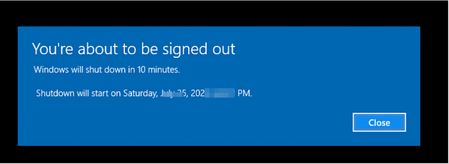
How can I prevent the blue prompts which look like the attached from appearing on Windows 10 2004? They appear from time to time. For instance, some time ago, one regarding Kaspersky appeared remindi...
- Dec 03, 2024
You can disable notifications for individual applications from the Windows Settings:
1. Open Settings (press Windows + I).
2. Go to System > Notifications & actions.
3. In the Get notifications from these senders section, find Kaspersky or any other application that sends these prompts.4.Toggle off the switch for that application.


MarciaFudge
Dec 04, 2024Iron Contributor
Some prompts can be triggered by scheduled tasks. If you want to find out if Kaspersky (or another program) has scheduled tasks causing these alerts:
Open Task Scheduler: Type Task Scheduler in the Start menu and open it.
Look for Kaspersky Tasks: Browse through the Library (usually under Kaspersky) to see if there are scheduled tasks that trigger those notifications. You can disable them if they seem unnecessary.