Forum Discussion

Chasesy
Aug 23, 2024Copper Contributor
Text rending issue on Windows Insider?
No text displayed. Does anyone know how to fix this issue?
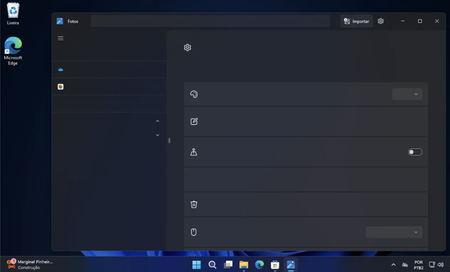
- Sep 01, 2024Yeah, it started happening with the 24H2 update. The same issue happens to the settings app if I leave it opened for a while (build 26100.1150).


CainKellye
Sep 29, 2024Tin Contributor
Update Windows Insider Build: Make sure you're running the latest version of the Windows Insider Build, as updates often include bug fixes.
Check graphics drivers: Outdated or incompatible graphics drivers can cause text rendering issues. Update the graphics driver via Device Manager or download the latest driver from the manufacturer's website.
Clear Font Cache: A corrupted font cache can cause rendering problems. To clear the font cache, do the following
Open a command prompt as an administrator.
Type the following command
net stop fontcache
del %WinDir%\FontCache3.dat
net start fontcache
Restart the computer.
Check graphics drivers: Outdated or incompatible graphics drivers can cause text rendering issues. Update the graphics driver via Device Manager or download the latest driver from the manufacturer's website.
Clear Font Cache: A corrupted font cache can cause rendering problems. To clear the font cache, do the following
Open a command prompt as an administrator.
Type the following command
net stop fontcache
del %WinDir%\FontCache3.dat
net start fontcache
Restart the computer.