Forum Discussion

System Windows Ram Problem Fix

SysMain - This is a Windows service that caches frequently used applications and data in RAM to improve performance. While it was meant to be a useful feature, it can sometimes cause issues with RAM usage and system performance.

Yes, SysMain can help, but during long system uptime it can also clog up RAM unnecessarily. My PC runs 24Hours a day, so I use a combination of: disabled SysMain + disabled Prefetch + occasional standby list cleanup.
After optimizing the RAM, it drops back to normal values and the system responds noticeably faster.
It’s a shame Windows doesn’t handle this automatically, because the standby list issue has been around for years.
 x8009Oct 02, 2026Copper Contributor
what micro stuttering did you notice?
do you have some kind video shows what actually happening with it?
because I am looking for specific issue with total computer lag all the time
I did notice 2 things on 2 different computers.
on 1 computer I have DDR5 64Gb top of the line hardware 7800x3d, 5090 , x870e , nvme.
on 2 computer I have DDR4 16GB i7-8700 , 1080GTX , Z370-P
When the 1st pc boot it has 56GB free memory or something
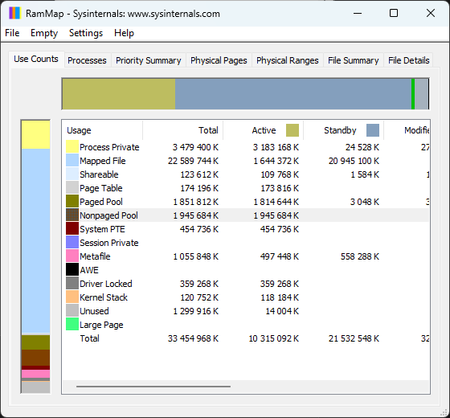
When the 2nd pc boot it instantly filling the memory with standbylist memory to 100%, there is no free memory anymore. it like chunks of 15% every sec after booting. I have no idea what can cause that. it feels the computer very slow and behave very laggy.
Can you explain what did you see in your place?