Forum Discussion

SOLVED: Bug or my mistake?
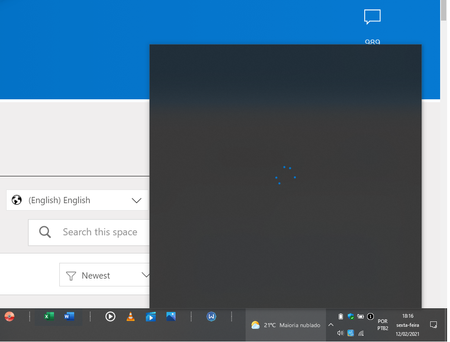
Hi HotCakeX ,
It's working now, I don't know why. I neither shut down or restarted the computer from yesterday to today, I left it hibernating. And now when I started using it again I realized that the information is showing up. Maybe what happened yesterday was some connection problem with the "information server" or whatever it is called ... it was not a problem with my internet connection because I could access any website at that moment ... Well, it wasn't nothing worrying, but less bad that everything is ok now.
Note: they need to adjust the text in the taskbar so that it does not appear incomplete and with "..."

Deleted
I had the same problem yesterday and gave up waiting, ended up restoring an image that had the feature enabled.
Not sure what they changed, but the commands to enable the feature did not seem to work correctly like they did in the previous builds.
- DeletedFeb 13, 2021Not applicable
I found out what really happened, but it works only as long as the computer is not restarted, if you need to restart the computer you need to perform the procedure again:
Activate the feature with ViveTool's "activate news feed.cmd" bat, restart, click on the taskbar context menu and select the option to display News and Interests. This procedure needs to be done only once.
Now comes the boring part: the problem shown in the image above happens, right? the trick here is to deactivate using "deactivate news feed.cmd" and then activate again with "activate news feed.cmd", all without restarting ok? doing so, News and Interests will return to display the news.
But if you restart the computer you will have to run the deactivate and activate commands again. As I leave my notebook practically all the time or hibernating or in sleep mode, sometimes I spend 1 week without restarting, so I don't suffer so much from the problem of having to run these commands all the time... but for those who use a PC without an external battery, they will have to do it practically every time.We won't have this problem when we are awarded the official version, hehe
- HotCakeXFeb 14, 2021MVPGood job,
when i activated this i only used 2 codes, now this bat files runs 5-6 codes, not sure what's different- fggIBFeb 23, 2021Steel Contributor
The hidden feature IDs are different in build 21318 than the ones that were used with build 21286, I just listed them all with vivetools on one computer that was working and then activated the same IDs in the one I needed, after deactivating the ones that did not work.
I also noticed a variant from the original version. Now it does not open the flyout by just hovering on the taskbar icon you actually need to click on the icon, the same as all the other icons on the taskbar, that is much better.
Here is the list of the IDs I found for Build 21318.
@echo on
cd /d %~dp0
::
vivetool addconfig 15221520 1 1 0 0 0 4
vivetool addconfig 21031911 2 1 0 0 0 4
vivetool addconfig 23226190 1 1 0 0 0 4
vivetool addconfig 23531064 2 1 2 0 0 4
vivetool addconfig 23562335 2 1 2 0 0 4
vivetool addconfig 23563673 1 1 0 0 0 4
vivetool addconfig 24779616 1 1 0 0 0 4
vivetool addconfig 24781215 2 1 1 0 0 4
vivetool addconfig 25253244 2 1 0 0 0 4
vivetool addconfig 26428025 2 1 0 0 0 4
vivetool addconfig 26533672 2 1 32 1 60000000 4
vivetool addconfig 27157625 2 1 0 0 0 4
vivetool addconfig 27299483 2 1 0 0 0 4
vivetool addconfig 27368843 2 1 0 0 0 4
vivetool addconfig 27371152 2 1 4 0 0 4
vivetool addconfig 27854511 2 1 0 0 0 4
vivetool addconfig 27967028 1 1 0 0 0 4
vivetool addconfig 28170999 2 1 0 0 0 4
vivetool addconfig 28555455 2 1 0 0 0 4
vivetool addconfig 28582629 2 1 0 0 0 4
vivetool addconfig 28622690 2 1 3 0 0 4
vivetool addconfig 28663185 2 1 0 0 0 4
vivetool addconfig 29650567 2 1 0 0 0 4
vivetool addconfig 29722045 2 1 32 1 a04f6a03 4
vivetool addconfig 29748112 2 1 0 0 0 4
vivetool addconfig 29748114 2 1 0 0 0 4
vivetool addconfig 29748116 1 1 0 0 0 4
vivetool addconfig 29748122 1 1 0 0 0 4
vivetool addconfig 29861382 2 1 0 0 0 4
vivetool addconfig 30785790 2 1 0 0 0 4
::
pause
