Forum Discussion

Remove post-auth confirmation for Windows Hello popup?
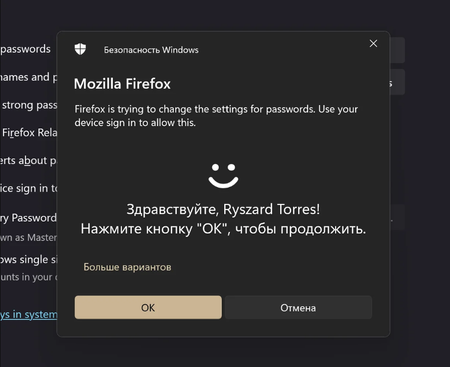

Option 1: Group Policy Modification (Enterprise/Professional)
Press Win+R and type gpedit.msc
Navigate to:
plaintext
Computer Configuration > Administrative Templates > Windows Components > Windows Hello for Business
Enable the policy:
plaintext
“Turn off login success notifications” → Enabled
Option 2: Registry Editor (all versions)
powershell
# Run with administrator privileges:
reg add “HKLM\SOFTWARE\Policies\Microsoft\PassportForWork” /v “DisablePostLogonAuthenticationDelay” /t REG_DWORD /d 1 /f
Effective Conditions:
AuthHost service needs to be restarted:
cmd. net stop AuthHost &&
net stop AuthHost && net start AuthHost
Option 3: Service downgrade
Open the Services Manager (services.msc)
Find:
plaintext
Windows Hello Biometric Service
Startup type changed to “Manual”
Note: It will slow down the authentication speed

I'm trying both option 1&2, and neither work. (On latest updated version of Windows 11 Pro).
We don't want to try Option 3.
In Group Policy, the option to “Turn off login success notifications” is not there.
In Services, there is no Microsoft AuthHost Service, and the file "authhost.exe" does not exist.
Has this service been deprecated and/or replaced?
Thanks for any feedback!