Forum Discussion

comnot
Feb 03, 2022Copper Contributor
ODBC Data Source ARM64 version could not create System DSNs
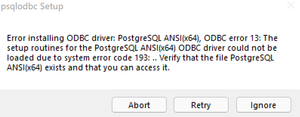
Hi, when I was trying to install PostgreSQL ODBC driver x64 version, I got a warning saying the driver could not be loaded due to system error code 193. My winver is Win11 Version 21H2 (OS Bu...

Pilares_Frank
Oct 11, 2024Copper Contributor
Ludelag I've copied odbcad32.exe.mui to C:\Windows\SysWOW64.
However I could not install the 64-bit version drivers for PostgreSQL (see for example https://www.postgresql.org/ftp/odbc/releases/REL-17_00_0002/), so what did you exactly do, because I need the 64 bit version to connect to a PostgesSQL database using Microsoft Power BI, which is 64 bits, because my Window 11 Pro is 64 bits.
Running on a M3 Pro chip via Parrallels.

genexx
Oct 11, 2024Copper Contributor
You should be able to have read that only a 32bit ODBC Driver could be installed and used on the Win 11 for Arm System 21H2.
There seems to be a possibility to build / compile an 32bit Version from postgres ODBC Driver but that is not my field, so you may have to make some additional homework.
I have now updated to 24H2 win11 for ARM Pro at UTM on MBA M2 and use still the 32Bit MariaDB ODBC driver with the VB6 Programm running via the registered VB6 dll reading from XAMPP MariaDB Database edited via HeidiSQL since Fall 2022.
They have updated the Emulator Prism in 24H2.
So you could try to Update to 24H2 and try the 64bit again.
If that not works you have to go 32bit as we had to.
There seems to be a possibility to build / compile an 32bit Version from postgres ODBC Driver but that is not my field, so you may have to make some additional homework.
I have now updated to 24H2 win11 for ARM Pro at UTM on MBA M2 and use still the 32Bit MariaDB ODBC driver with the VB6 Programm running via the registered VB6 dll reading from XAMPP MariaDB Database edited via HeidiSQL since Fall 2022.
They have updated the Emulator Prism in 24H2.
So you could try to Update to 24H2 and try the 64bit again.
If that not works you have to go 32bit as we had to.
- Pilares_FrankOct 12, 2024Copper ContributorI used the workaround as described in https://learn.microsoft.com/en-us/answers/questions/1059343/odbc-64-bit-error-193To summarize the workaround: configure with the 32-bits version first and then copy over the registry setting to the 64-bits version