Forum Discussion

Nvidia driver keeps crashing my Windows 11
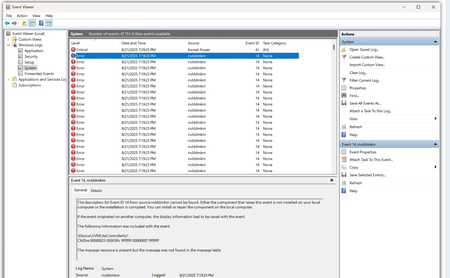

If you can extract the specific error codes or messages from your Event Viewer logs, I can help interpret them further. Feel free to share those details, and I can guide you on precise fixes.

Hi ColoradoRiver , not the OP, but I get the same issues. It is always event ID 14 and 153 together, whenever I play a game. Sometimes it happens in 2 minutes, sometimes 15 minutes.
If you can help, that would be great. I have tried almost all the fixes that are on the web, but I get this on all games now.
The description for Event ID 14 from source nvlddmkm cannot be found. Either the component that raises this event is not installed on your local computer or the installation is corrupted. You can install or repair the component on the local computer.
If the event originated on another computer, the display information had to be saved with the event.
The following information was included with the event:
\Device\Video3
322b4215 00013908 00000000 2025c560 2025c9e0 2025e6e4 2025c74e 2028c358
<this part varies. example:
\Device\Video3
- timeout error waiting for NV_UFLUSH_FB_FLUSH = 0x2 cnt=398495>
The message resource is present but the message was not found in the message table
--------------------------
The description for Event ID 153 from source nvlddmkm cannot be found. Either the component that raises this event is not installed on your local computer or the installation is corrupted. You can install or repair the component on the local computer.
If the event originated on another computer, the display information had to be saved with the event.
The following information was included with the event:
\Device\Video3
UCodeReset TDR occurred on GPUID:a00
The message resource is present but the message was not found in the message table