Forum Discussion

My computer has been infected by viruses, malware and security threats
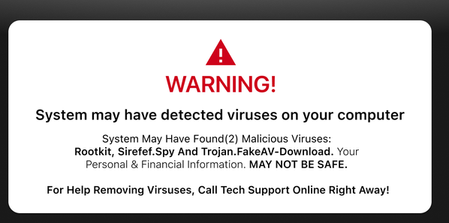

Fake Antivirus: Pop-ups that mimic legitimate programs (like Windows Defender or McAfee) and prompt you to pay for useless software to "remove" a fake virus.
Browser Lockers: Malicious scripts that freeze your browser or display full-screen warnings, often locking your mouse and keyboard
Tech Support Scams: Alerts that provide a fake customer support phone number for you to call, where scammers will attempt to steal your credit card details or gain remote access to your computer
Rogue Notifications: Fake calendar invites, calendar reminders, or malicious browser notifications that push alarming links directly to your desktop.
and so on...
I will give a short example. Let's say you want to log in to your Microsoft account, as always. It says: "You have already used this password, you entered the password incorrectly, so you have to wait 24 hours and only then can you try again." You, who are also smart and entered the password completely correctly, cannot believe your eyes and do not understand what is actually happening. You think that you automatically logged in with an old password with your mobile phone.
"You can believe in God" can usually also be in a church. In such cases, however, you restart the search engine, Google Search and enter: "Log in to Your Microsoft Account"
Miracle of miracles, you can log into your account without any problems, and it turns out that you did not use any wrong password anywhere.
Another example: You are watching a movie on YouTube. All of a sudden, the sound stops, you can't hear anything, you check that the sound drivers are working perfectly, but you are forced to set them up again, and then "you have to restart the machine for the drivers to work" Familiar?
There is no malware or virus on your computer. Who knows your login information, Microsoft or all the others? The little rascal to whom you give this information will use it right away.
It only needs a cheap useless "Laptop" or more precisely a "Tablet PC", which was manufactured directly for this purpose, so that it can quickly find any PC or mobile phone and shows exactly where that machine is on a 3D card.
You can also program this small, strange laptop. When you are away from the machine, it can automatically send interesting codes to your machine that you never thought could exist.
So, does this mean that your computer is actually connected to the Internet through this laptop? Yes.
Can you find where it is and identify its exact address? Yes. it's just the little smart guy, he doesn't use an address, but what you see is fake, because he keeps changing his own address so that you think that it's impossible to catch the little smart guy.
You can get it, and you can also quickly destroy the garbage used by this smart little guy. But when you're already happy, there's a little problem. He buys and uses another machine, which is not the same, but works on the same principle as the old one. Are we talking about just a little smart person here? No, there are several thousand of them, and they deal with these 24 hours a day, nothing else, and they even get paid well for it.
How do I know all this? From the fact that they used to call me many times on the phone to talk me out of it, to make me realize that it was hopeless and to work, because there are many programs that I can work on and so on. And since I don't earn a penny from this, why bother with them?
I think this is enough, so that if you understood something from what I wrote, you will be able to find a strategy that can be used in practice.
Perhaps it is worth mentioning here that you are automatically logged in to all kinds of websites, and when this little rascal has found all your passwords, he will use them.
You, the smart programmer, stand up for this and replace all of them, which is not a bad idea. If you didn't do something right, you'll be in trouble, because it will quickly figure it out, that is, it will find it, or if it doesn't, it will decipher it with another simple program, etc...
How do you know that what I wrote here is true? From there, from the pictures you show here.
There are all sorts of other things here. it is worthwhile to carefully review these settings, which are for example related to the special search program called "EDGE" and "Google search", you see these threats in them, don't you?
Maybe just that if I say that VBScripts and Java script are very dangerous virus download programs, it would mean that I am not normal. They have nothing to do with anything in the world. It is possible that in those programs it might happen that they could use something like that, maybe. However, if I say, "Power Shell is there, use it", then the smart person will probably use it and create another such strange program that does not contain any VBScripts.