Forum Discussion

Message Mentioning Voicemeeter when I Don't Have It
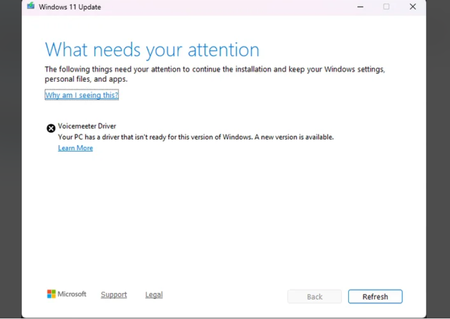

This alert (from October 2024) is checking the Voicemeeter driver version also in depository (even if no more installed, Windows keeps a copy of the driver somewhere in a depository). This issue has been fixed in November 2024 by a Voicemeeter update. So to remove this Windows Message, the simplest way is to install latest Voicemeeter version.
Other way is to delete the Voicemeeter driver in Windows depository by using pnptool (with command prompt in administrator mode).
you may use this line to enumerate audio devices:
pnputil /enum-drivers /class MEDIA
and find the oem name related to vbvoicemeetervaio64_win10.inf
then use this instruction to force deletion:
pnputil /delete-driver oemxxx.inf /force
More info about this issue on VB-Audio forum: https://forum.vb-audio.com/viewtopic.php?t=1928