Forum Discussion

Steve Whitcher
Jul 24, 2018Bronze Contributor
Logging on to Remote Desktop using Windows Hello for Business & Biometrics
In the release notes for build 17713, support was announced for logging into remote desktop sessions using biometrics via windows hello. I have a few questions I'm hoping someone can answer: The...
 Oct 03, 2018
Although late, we have published information around WHfB with RDP :

amreagan
Aug 04, 2021Copper Contributor
Crossposted on Reddit: https://www.reddit.com/r/sysadmin/comments/oxzj5f/using_certificate_authentication_for_rdp_in/
I've got a working key trust deployment and have created an AD CS template for user certificates as described in https://docs.microsoft.com/en-us/windows/security/identity-protection/hello-for-business/hello-deployment-rdp-certs.
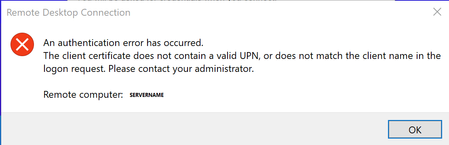
After obtaining the user certificate, I attempt to connect to another Windows device via RDP. Hello takes facial recognition/fingerprint, but gives the message , "An authentication error has occurred. The client certificate does not contain a valid upn, or does not match the client name in the logon request."
However, if I select "more choices" and select the UPN-based security device credential it works. If I remove the cert, it breaks, which leads me to assume that certificate is working. Judging on the other options listed under more choices it looks like fingerprint and face are trying to pass domain\samaccountname instead of UPN. Has anyone figured out a workaround for this?
I've got a working key trust deployment and have created an AD CS template for user certificates as described in https://docs.microsoft.com/en-us/windows/security/identity-protection/hello-for-business/hello-deployment-rdp-certs.
After obtaining the user certificate, I attempt to connect to another Windows device via RDP. Hello takes facial recognition/fingerprint, but gives the message , "An authentication error has occurred. The client certificate does not contain a valid upn, or does not match the client name in the logon request."
However, if I select "more choices" and select the UPN-based security device credential it works. If I remove the cert, it breaks, which leads me to assume that certificate is working. Judging on the other options listed under more choices it looks like fingerprint and face are trying to pass domain\samaccountname instead of UPN. Has anyone figured out a workaround for this?
RossWalker
Aug 04, 2021Copper Contributor
I believe the smart card login is defaulting to the key trust certificate rather than the smart card one you created. As my user base can’t even put up with picking a cert to login with, they want true SSO, I went with the Remote Credential Guard option on our WHfB devices which works like a charm.