Forum Discussion

Logging on to Remote Desktop using Windows Hello for Business & Biometrics
 Oct 03, 2018
Although late, we have published information around WHfB with RDP :

The method that has seemed to work best for us is to enable Remote Credential Guard which works directly with Windows Hello for Business to provide SSO RDP. We made our environment all RCG friendly by applying the DisableRestrictedAdmin registry item and the "Remote host allows delegation of non-exportable credentials" GPO setting at the domain level, then applied the "Restrict delegation of credentials to remote servers" just to the laptops OU. If your RDP servers access other RDP resources internally, then you may want to apply RCG settings to those too to make nested RDP SSO.
The only issue is if you have any pre-2016 RDP servers, which don't support RCG, as clients will refuse to connect to any RDP server that doesn't support RCG (wish MS had an exception list for this!). A couple work arounds for these legacy RDP servers is, 1) to use the RDWeb Web Client for those services until such time as they can be migrated to 2016/2019, 2) keep a 2016+ RDP server without RCG as a jump-off point for those services.

fyi - we have this deployed in production
https://docs.microsoft.com/en-us/windows/security/identity-protection/hello-for-business/hello-deployment-rdp-certs
 StephenGNov 01, 2022Copper Contributor
Clint Lechner all went well till I hit this command
certutil -dstemplate \<TemplateName\> \> \<TemplateName\>.txtCan't make heads or tail of what to leave or remove so if my template is called
"authenticationCertificate" how would this code above be formatted?
- Clint LechnerNov 01, 2022Iron Contributor
I think they overcomplicated it.
certutil -dstemplate "authenticationCertificate" > "Output.txt"note, "authenticationCertificate" is the name of the template within your CA. Output.txt is simply a text file that gets created in the same directory you're running that command.
- StephenGNov 02, 2022Copper Contributor
Clint Lechner That was totally it and worked perfectly I was even able to import with no errors.
thank you very much
- RossWalkerApr 24, 2021Copper ContributorI saw that article and followed it, which was similar to what has already been posted about using endpoint mgr to deploy smart card certs to passport after the fact. The how-to for deploying them using an in-house CA was nice though.
It works, but had issue where RDP client would first pick the wrong cert and you would need to manually chose the correct cert so there is a cert ordering issue. Also, there is still the issue where only one RDP session can use the smart card cert at a time, is that for everyone or just me? We utilize multiple RemoteApp servers for line of business apps, so being able to log into multiple sessions simultaneously is needed.
Fix the certificate ordering issue and allow simultaneous access to the cert from multiple RDP sessions and then we might have a workable solution, but in the meantime we’re continuing to use Remote Credential Guard for domain computers which works very nicely except that RDP over UDP doesn’t work with it.- amreaganAug 04, 2021Copper ContributorCrossposted on Reddit: https://www.reddit.com/r/sysadmin/comments/oxzj5f/using_certificate_authentication_for_rdp_in/
I've got a working key trust deployment and have created an AD CS template for user certificates as described in https://docs.microsoft.com/en-us/windows/security/identity-protection/hello-for-business/hello-deployment-rdp-certs.
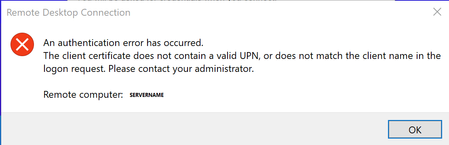
After obtaining the user certificate, I attempt to connect to another Windows device via RDP. Hello takes facial recognition/fingerprint, but gives the message , "An authentication error has occurred. The client certificate does not contain a valid upn, or does not match the client name in the logon request."
However, if I select "more choices" and select the UPN-based security device credential it works. If I remove the cert, it breaks, which leads me to assume that certificate is working. Judging on the other options listed under more choices it looks like fingerprint and face are trying to pass domain\samaccountname instead of UPN. Has anyone figured out a workaround for this?- Martin LimJan 10, 2022Copper ContributorHi,
Have you figure it out what the issue was?
I'm having the same issue