Forum Discussion

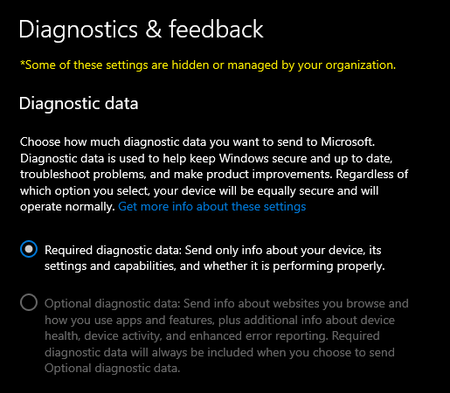
I cant turn on optional Diagnostic data
 Jul 14, 2021to resolve this do the following
Hello,
Let's have that resolved. Follow steps below to configure through the Reg file:
The .reg files below make changes to the DWORD value in the registry key below.
HKEY_LOCAL_MACHINE\SOFTWARE\Microsoft\Windows\CurrentVersion\Policies\DataCollection
AllowTelemetry DWORD
0 = Security (Enterprise and Education editions only)
1 = Basic
2 = Enhanced
3 = Full (Recommended)

Deleted
Been there.. done that... I even did a complete factory reset because it's just a spare laptop that no one in the family uses. Once I had completely reset it, I was able to adjust the data settings. However, when I attempted to join the Beta program I got a different message that it didn't meet the hdwe requirements. Upon further research, this laptop is just old enough to NOT have a TPM chip. On another note... I "think" I now know what the offending program was.
After I gave up on using the laptop for the Beta program, I reinstalled my Norton 360. BAM! I was locked out of changing the settings again. I tried disabling Norton and then checked the settings again. I was still locked out. So..... it has to be something in Norton that is locking down those settings. I'm assuming it's because this laptop doesn't have a TPM chip. at least that makes sense in my mind...

Thank you for your answer so this is a difficult case.