Forum Discussion

Hemanth955
Dec 19, 2023Copper Contributor
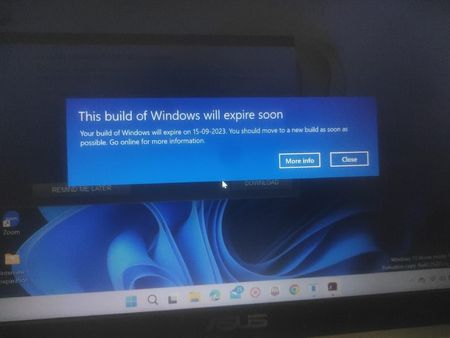
I am getting an insider privew pop up message for every one hour. Give me an solution.

Anikaa
Jan 28, 2026Brass Contributor
That popup appears because you’re running an expired Windows Insider Preview build. Once a build reaches its expiration date, Windows will keep reminding you every hour.
You have only two real options:
Option 1 (Recommended): Update to a newer build
Go to Settings → Windows Update and install the latest available Insider build.
This immediately stops the popup.
Option 2: Leave the Insider Program
If you don’t want Insider builds:
- Go to Settings → Windows Update → Windows Insider Program
- Choose Stop getting preview builds
- Then upgrade to a stable public release (clean install may be required)
Important:
There is no supported way to permanently disable this warning without upgrading. It’s a built-in expiration safeguard.
Summary:
The hourly popup means your Insider build has expired. Updating to a newer build or switching back to a stable Windows release is the only fix.