Forum Discussion

Yarisyoyo
Jan 29, 2026Bronze Contributor
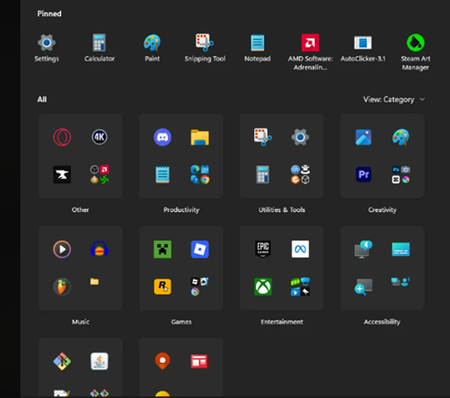
How to Remove These Annoying Category Folders in the Windows 11 Start Menu?
Need help! Many category folders (such as "Productivity tools," "Creativity," "Games," etc.) have automatically appeared in my Start Menu, grouping the application icons that were previously displaye...

Attila Matyas
Jun 09, 2026Brass Contributor
Click on the "View Category" and change it to "View List". Found "Microsoft Store" then click on it and down to the left > Downloads > Update or Update All" and wait, then check again until everything is installed.
Now you can see in the list all kinds of apps. Select the apps you don't want, and right click, then "Uninstall"
😜