Forum Discussion

Yarisyoyo
Jan 29, 2026Bronze Contributor
How to Remove These Annoying Category Folders in the Windows 11 Start Menu?
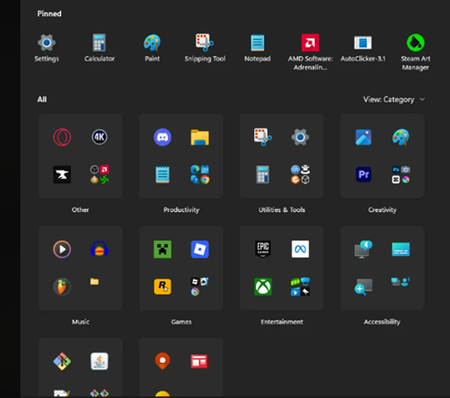
Need help! Many category folders (such as "Productivity tools," "Creativity," "Games," etc.) have automatically appeared in my Start Menu, grouping the application icons that were previously displaye...

Maxim4ik
May 17, 2026Tin Contributor
I found a solution!!!
Just put this in Command Prompt by Administrator
reg add "HKCU\Software\Microsoft\Windows\CurrentVersion\Policies\Explorer" /v NoStartMenuMorePrograms /t REG_DWORD /d 1 /f && taskkill /f /im explorer.exe && start explorer.exe
 christastropheSep 14, 2026Copper Contributor
I just did this thinking it was going to remove the pinned category from the top and leave the rest but it did the opposite. Is there a way to revert it back?
 CinahcemJun 27, 2026Tin Contributor
If only Microsoft could provide the option in the settings... But no, that would be too simple; they really love disappointing their customers...
Thx sir !
 claroquesiJun 17, 2026Tin Contributor
Thx mate!
When will they stop messing up with this useless piece of crap..
 adadionJun 15, 2026Copper Contributor
Works! Thank you. So annoying this update.
- theNuggitManJun 09, 2026Copper Contributor
Thank you SO MUCH - this works!
- Timothy1525May 20, 2026Steel Contributor
This worked for me, thx
