Forum Discussion

Yarisyoyo
Jan 29, 2026Bronze Contributor
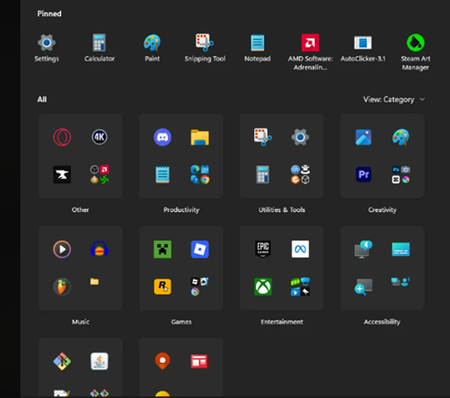
How to Remove These Annoying Category Folders in the Windows 11 Start Menu?
Need help! Many category folders (such as "Productivity tools," "Creativity," "Games," etc.) have automatically appeared in my Start Menu, grouping the application icons that were previously displaye...

mohdadeeb
May 14, 2026Iron Contributor
Those category folders in the Windows 11 Start Menu are usually tied to the “Start menu recommendations” and app grouping behavior. You can reduce or remove them by going to Settings > Personalization > Start and turning off options like “Show recently added apps” and “Show recommendations.” If the layout still feels cluttered, rebuilding the Start menu cache or unpinning grouped apps can also help.