Forum Discussion

How to Remove These Annoying Category Folders in the Windows 11 Start Menu?
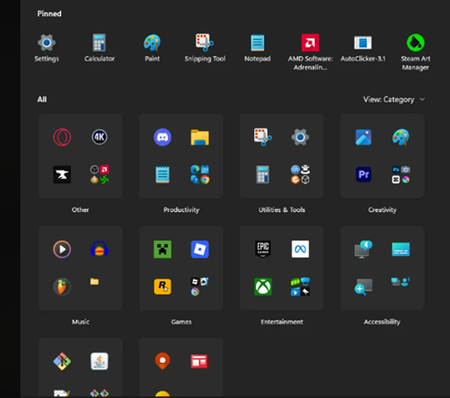

In the Start Menu, you've View: set to Category. You can change this View to Grid or List and that will resolve this issue.
 TARLokiJul 15, 2026Copper Contributor
Das bringt aber nix. Spätestens nach einem Neustart ist alles beim alten. Mal abgesehen davon, dass die Listenansicht ebenfalls fürn Arsch ist. Wenn ich dort einen Ordner aufklappe, und sich darin Verknüpfungen befinden, die ähnlichen Namen und Bilder haben, sehe ich immer noch nicht, welches Programm ich klicken muss.
Das ist mehr als ätzend.
Hinzu kommt, dass diese Ansicht sich nirgends anpassen lässt.Translation
But that doesn't help at all. After a restart at the latest, everything is back to the way it was. Not to mention that the list view is also crap. If I open a folder there and it contains shortcuts with similar names and icons, I still can't tell which program I need to click on. It's more than annoying. On top of that, this view can't be customized anywhere.
 MedinocJun 16, 2026Tin Contributor
It doesn't stick. A couple minutes later it's back to Category.
- Mark_CAJul 20, 2026Iron Contributor
After a Group Policy Update it reverts to Category View! Had it happen multiple times by now!
For more Info you can go here:
https://james-rankin.com/articles/quickpost-windows-11-start-menu-reverts-to-category-view-after-group-policy-refresh/