Forum Discussion

How to Disable or Remove the Interfering Share Pop-up Bar in Windows 11File Explorer?
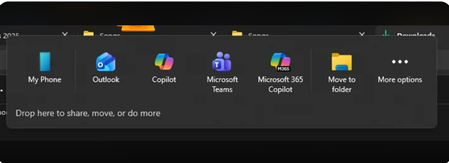

Yes this behavior is now part of a newer Windows 11 feature called the Drag Tray (sometimes referred to as the Drop here to share, move or do more bar). It appears when dragging files near the top of the screen and can interfere with File Explorer tab drag and drop workflows exactly as you described.
The good news is that on newer builds of Windows 11, Microsoft finally added a toggle to disable it.
You can turn it off here:
Open Settings
Go to System
Open Nearby sharing
Find Drag Tray
Toggle it Off
Several users confirmed this resolves the issue immediately.
At the moment:
There is no known Group Policy setting specifically for this feature.
There is no officially documented Registry key from Microsoft for disabling it system-wide.
Earlier Windows 11 builds did not expose any disable option at all.
This behavior appears tied to the ongoing redesign of File Explorer introduced across Windows 11 22H2 and later updates, where Microsoft has repeatedly changed drag-and-drop behavior in Explorer tabs and the address bar.
If you want to submit feedback directly to Microsoft the official channel is:
Feedback Hub app
Inside Feedback Hub:
Choose Report a problem
Category: Files, Folders and Online Storage and File Explorer
Include a screen recording showing the drag tray blocking tabs
Microsoft engineers do monitor highly upvoted reports especially for Explorer usability regressions.