Forum Discussion

Patel_Nishit_M
Apr 03, 2023Copper Contributor
how to change windows insider program Canary to dev channel
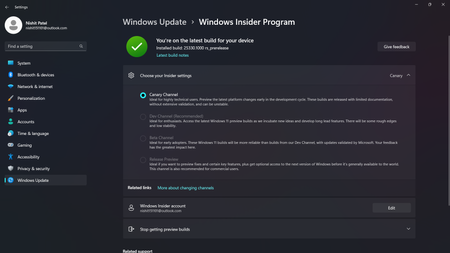
- Apr 04, 2023As per Microsoft, Insiders can’t switch to a channel that is receiving builds with lower build numbers without doing a clean installation of Windows 11 due to technical setup requirements.
So in this case, you need to make clean install.
Refer 'Switching Channels' here:
https://blogs.windows.com/windows-insider/2023/03/06/whats-coming-for-the-windows-insider-program-in-2023/


ABHRANILRAY
Dec 30, 2023Copper Contributor
Patel_Nishit_M I was once in the dev channel and I wanted to go to the canary channel. So i opened the choose channel page in Settings and found that only dev and canary were available there. A green tick was showing that I was on the latest build for dev channel. But, when I changed to canary, a cross was showing to go back to settings and check the update. I went and found that 26016 was showing. I normally proceeded to update and afterward, I was on canary and all the other 3 menus dimmed. So, that means I have to stay on canary or do as the last solution reply given by KapilArya
 Critch1982Jan 04, 2024Copper Contributor
Same here, But i never chose to be in canary channel!
Bit naughty that we have to do a fresh install, when i didnt choose it..