Forum Discussion

Samuelyur
Mar 30, 2026Copper Contributor
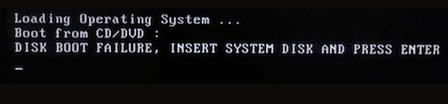
How do I fix disk boot failure from my windows 10 pc?
Hi everyone, Made a bootable USB drive and tried to boot from it. However, this error message shows up on the screen: Disk Boot Failure, Insert System Disk and Press Enter Not sure what caused t...

Truetto
Mar 30, 2026Copper Contributor
If you're facing a "Disk Boot Failure in Window 10", one of the most straightforward and effective methods to resolve it is by using Windows' built-in recovery tools. This approach is particularly useful because it doesn't require a separate bootable external drive, making it convenient for those who are dealing with a boot failure in the first place.
How to Use:
- On a working Windows computer, search for "Recovery Drive"
- Check "Back up system files to the recovery drive" (important!)
- Select a USB drive (at least 32GB)
- Click "Create" and wait for completion
- On the failing computer, boot from this USB drive
- Select "Troubleshoot" > "Advanced Options" > "System Restore" or "Command Prompt"
Important
If disk boot failure in Windows 10, always back up your files before making any changes to your system, especially when dealing with advanced troubleshooting steps.
These steps should be attempted with caution, as they involve modifying system settings and files. If you're not comfortable with these steps, it's always best to consult a professional for assistance.