Forum Discussion

How do I fix disk boot failure from my windows 10 pc?
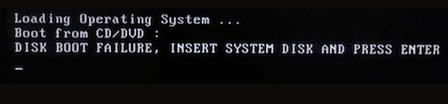

Fixing the boot configuration with command-line tools is a reliable way to resolve disk boot failure on Windows 7 caused by corrupted boot records or boot configuration data. It essentially lets you repair the system’s boot files in just a few steps, allowing you to restore normal startup without data loss.
Usage Guide: Boot your computer from a Windows 7 installation USB, select "Repair your computer", then go to Troubleshoot → Advanced Options → Command Prompt. Run the following commands in order: bootrec /fixmbr, bootrec /fixboot, bootrec /scanos, bootrec /rebuildbcd. After all commands finish, type exit and restart your computer. This method requires no extra software and swiftly helps you fix disk boot failure on Windows 7, effectively resolving startup issues caused by damaged boot files.
It is particularly useful for repairing corrupted MBR, fixing boot configuration errors, troubleshooting unbootable Windows 7 systems, or restoring startup after system updates or disk changes.