Forum Discussion

Having Problems Updating to Windows11 22623.741/746
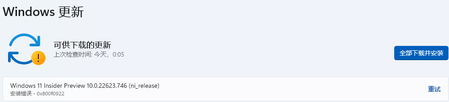


Because the in-place update does not change the system settings, and does not delete the application, so the error may still occur, because the cause of the conflict will not be removed.
- Eason_C1210Oct 22, 2022Brass Contributor
Deleted
I may have some tough issue to handle right away
My account was switched from administrator to normal one by accidentally operation
I have no idea why the run code "netplwiz" would allow me to switch my only administrator account to a normal one
Now I can not run any application which need to "run as administrator", including "Setup.exe" in ISO file
What should I do now?
I have question about this issue in Microsoft Community, but so far there's still no one replied it.
By the way, the normal solution (Safe Mode) isn't help now, because even I switch to Safe Mode, the account control still informs me that I need to run as administrator, otherwise I can't use it.
Please help me!- DeletedOct 22, 2022Not applicable
please check if the system activation is linked to your Microsoft account?
create a Windows administrator account and add this account to Windows:
https://support.microsoft.com/en-us/windows/create-a-local-user-or-administrator-account-in-windows-20de74e0-ac7f-3502-a866-32915af2a34d
- Eason_C1210Oct 22, 2022Brass ContributorThe ONLY account my system now have is a local standard account, which prevent me from creating an administrator account
What's more, I haven't use my Microsoft account as the login account, because I prefer not to login through the password, so I didn't log into it.
That means that there's only a local standard account in my system and I can't do anything that might need to do now (INCLUDING system reinstall, app install, account setting and other critical movement)
Please, I really need help.
