Forum Discussion

Fix no audio issue after Windows update
- Mar 21, 2025
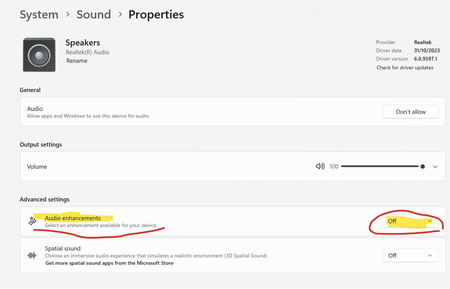
Had the same issue—no sound after a Windows update. Turning off Audio Enhancements under System > Sound > Properties fixed it instantly.


this is not working - i don't see properties - i just see "no audio devices found" out of the sudden - worked fine yesterday, i made no changes... ...
I absolutely hate Windows 11 (the only Windows I was happy with were XP and 7; all others are just piece of garbage); for a while I had the 'audio renderer problem' every week; then the last week one morning I just could not access Internet - no page would open in either Chrome or Firefox, and I could not ping even Google from the command prompt - I wasted time on calling Fidium and router people - because the problem was not in them and not in my computer hardware but in the operating system that works against users and not to the consumer/customer benefit; i had to do 'network reset' suddenly to make it work - why? - it worked fine as it was for months before that: you did something behind customers backs to cause that. And today I have no audio: "no audio devices installed" - but that is a lie: audio devices are installed, and they worked just fine as of yesterday, and I did not make any changes to my setup - no, it is again YOU - Windows decided to capriciously block my computer's access to audio - and now I have to spend hours and hours looking through the support files and fiddling with settings to find out what is wrong - all without a shred of support from you; when I went through Device Manager and searched for drivers I got a list long 119 pages - I don't have time for this, I am not paid for this - some entries turned back the message: "Failed to add driver to the system. Error 0xE000022F: The third-party INF does not contain digital signature information." - I don't even know what else doesn't work besides audio right now, or what exactly to look for. But let me tell you what I want: I want seamless access to Internet, email, browsers, I want my speakers, my microphone, my camera to work instantly, without any permissions or requests, I want my scanner and my printer to work on demand without any fiddling, I want my USB sticks to be read and accessed when I plug them in, I want my bluetooth devices to connect instantly - I don't want and I don't need most of the features you now offer to "protect" me and my data at cost of my peripheral devices not working properly because your software is blocking them - I don't need 365, OneDrive, Azure, InTune, etc. - i just need a dumb operating system that sits quietly on my desktop and makes sure my peripherals work on demand and my internet is fast and reliable so I can get my work done and enjoy my old age in peace, and not have to find out what again is wrong and why every week; I asked my son to install Linux on my desktop as soon as he can, and I can't wait to say good riddance to Microsoft spyware; on top of that I plan on writing to the FCC and FTC about this experience, and to my congressional delegation (Sanders, Welch, Balint); I am also going to insist to my local political representatives to make the State of Vermont stop using Microsoft 365 secure messaging (also a total disaster) - we, the citizens of Vermont should not feed such an evil company with our data