Forum Discussion

AlexandraMorton
Jul 03, 2024Copper Contributor
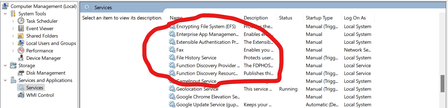
Firmware switch service missing in Computer Management
This means I'm unable to disable a seemingly randomly appearing "Configuring your mobile broadband device" message. (Although it increments from 0-100% I believe it's redundant.) How do I i...

Tomasstes
Aug 21, 2024Bronze Contributor
1.Check Windows Version
Ensure that you are using a version of Windows that supports the firmware settings feature in Computer Management (typically Windows 10 or later).
2. UAC and Permissions
Make sure that you are running the Computer Management console with administrative privileges. Right-click on the Start button and select "Computer Management" with administrative permission if required.
3. Check for UEFI vs. BIOS
Verify if your system uses UEFI instead of traditional BIOS. The Firmware settings option may only show up in systems utilizing UEFI.
4. Check for Updates
Ensure that Windows is updated to the latest version. Sometimes, missing features can be resolved through Windows updates.
5. Access Firmware Settings Directly
If the option is still missing, you can access firmware settings by:
Restarting your computer and entering the BIOS/UEFI menu (usually by pressing a key like F2, F10, DEL, or ESC during startup).
In Windows, go to Settings > Update & Security > Recovery and under Advanced startup, click on Restart now. After the restart, you can navigate to Troubleshoot > Advanced options > UEFI Firmware Settings.
Ensure that you are using a version of Windows that supports the firmware settings feature in Computer Management (typically Windows 10 or later).
2. UAC and Permissions
Make sure that you are running the Computer Management console with administrative privileges. Right-click on the Start button and select "Computer Management" with administrative permission if required.
3. Check for UEFI vs. BIOS
Verify if your system uses UEFI instead of traditional BIOS. The Firmware settings option may only show up in systems utilizing UEFI.
4. Check for Updates
Ensure that Windows is updated to the latest version. Sometimes, missing features can be resolved through Windows updates.
5. Access Firmware Settings Directly
If the option is still missing, you can access firmware settings by:
Restarting your computer and entering the BIOS/UEFI menu (usually by pressing a key like F2, F10, DEL, or ESC during startup).
In Windows, go to Settings > Update & Security > Recovery and under Advanced startup, click on Restart now. After the restart, you can navigate to Troubleshoot > Advanced options > UEFI Firmware Settings.
 OWDISDec 08, 2025Copper Contributor
Unhilfreicher könnte die Antwort kaum sein. Der Service taucht auch mit Adminrechten nicht auf. Alle anderen "Tipps" sind völlig an den haaren herbeigezogen ,das hätte ChatGPT mir auch generieren können. Danke für nichts. Das Pop-Up verhindert aktiv das Arbeiten mit den Geräten, einfach kein Windows verwenden, dann kann man auch ordentlich arbeiten, eine andere Antwort scheint es ja leider nicht zu geben, das eine Gehirn, was sich alle MS Servicepartner teilen scheint ja wohl mit der Frage überfordert zu sein... -.-