Forum Discussion

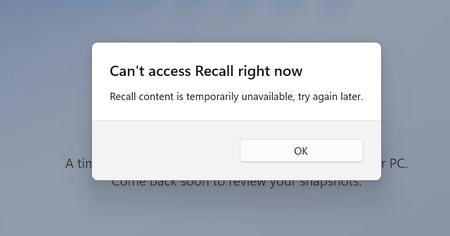
"Can't access Recall right now"

Make sure your Windows 11 system is fully updated. Sometimes a new update can fix bugs or issues that were introduced with previous ones. Go to Settings > Windows Update and check for updates.

Hi everyone,
I'm using an HP OmniBook 5 16-ag1087AU Copilot+ PC with:
• Windows 11 Home Single Language
• Version 25H2
• Build 26200.8973
• AMD Ryzen AI 7 350
Recall worked correctly from the day I purchased the laptop.
After Windows updates, Recall requested Windows Hello verification. After that it disappeared from Settings.
Since then I have completed extensive troubleshooting with Microsoft Support and HP Support.
Completed:
• BIOS updated
• HP drivers updated
• Windows Hello working
• Device Encryption enabled
• NPU detected correctly
• DISM clean
• SFC clean
• In-place repair installation completed
• Recall Windows Feature reinstalled
• Recall payload downloaded again
• Recall Feature = Enabled
• MicrosoftWindows.Client.AIX installed
• MicrosoftWindows.Client.CoreAI installed
• Recall appears under System Components
• Recall scheduled tasks exist
• Click to Do works correctly (Win + Q)
However, Recall still does not appear under Settings > Privacy & Security and crashes immediately when launched.
Event Viewer shows:
Application Error
Faulting application:
AIXHost.exe
Faulting module:
AIXView.dll
Exception:
0xc000027b
Windows Error Reporting also records an APPCRASH for AIXHost.exe.
Microsoft Support currently believes this is a software issue rather than a hardware compatibility issue.
Has anyone with a Copilot+ PC experienced the same AIXHost.exe / AIXView.dll crash?
Any guidance from the Windows Recall team would be appreciated.