Forum Discussion

filrea
Mar 22, 2024Copper Contributor
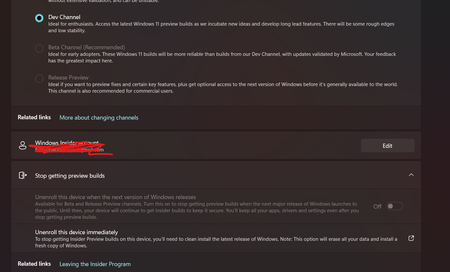
Cannot stop getting insider preview builds
I dont want to do a clean reinstall, does anyone have an idea how to fix this?
 DeletedMar 23, 2024

PlushTush
Mar 23, 2024Copper Contributor
Open Settings in Windows.
Go to the "Update & Security" section.
Select Windows Insider Program.
Click on the "Stop getting preview builds" button.
Removing the registry key: If you are still getting preview builds after disabling the Windows Insider program, you can try removing the registry key that is responsible for it. Be sure to back up your registry before doing this.
Go to the "Update & Security" section.
Select Windows Insider Program.
Click on the "Stop getting preview builds" button.
Removing the registry key: If you are still getting preview builds after disabling the Windows Insider program, you can try removing the registry key that is responsible for it. Be sure to back up your registry before doing this.