Forum Discussion

Sliseal0324
Feb 08, 2022Tin Contributor
Camera doesn't work in windows insider program
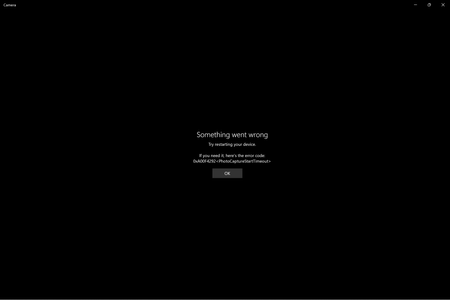
My camera doesn't work in windows 11 22543. I am using a surface book 2. I will post the error code below. Specs- Device name Private Processor Intel(R) Core(TM) i7-8650U CPU @ 1.90GHz 2.11 G...
- Feb 09, 2022Suggest you to check Camera drivers and make sure they're working else reinstall them. If issue still persists, wait for the next build to arrive. Meanwhile, report this problem via Feedback hub app.


Little_Joe
Feb 09, 2022Bronze Contributor
Hello,
Try press "Winkey + R" then run with "devmgmt.msc" to open up Device Manager then check whether there is a exclamation on Camera. If yes better to download and install the Camera drivers from MS site.
Try press "Winkey + R" then run with "devmgmt.msc" to open up Device Manager then check whether there is a exclamation on Camera. If yes better to download and install the Camera drivers from MS site.
 Sliseal0324Feb 10, 2022Tin Contributor
Little_Joe I contacted MS support after this and I got the reply saying you would need to reinstall windows because the windows insider program is not responsible or something? I forgot what the agent said but something like that. I reinstalled windows and now it's working! unfortunately lost all data 😞 Anyways, thanks!