Forum Discussion

Auto Arrange Icons not working inside folders
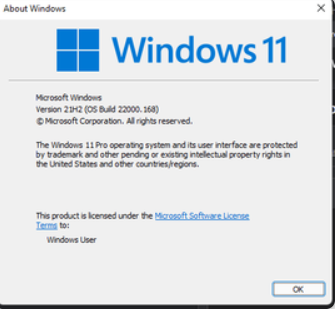

I see from your screenshot that you’re running Windows 11 Pro, Version 21H2 (OS Build 22000.168) — that’s one of the very early builds of Windows 11, and some of the symptoms you describe (auto arrange icons not working, folder selection lag with arrow keys) were known issues in older builds.
Here’s a step-by-step approach to fix it:
a) Please Update Windows
Go to Settings → Windows Update → Check for updates.
Install all pending updates, especially feature updates (you may jump to 22H2 or 23H2).
b) Enable “Auto Arrange Icons” If this is for desktop icons:
Right-click on desktop → View → Make sure "Auto arrange icons" is checked.
If it’s for files inside a folder:
Right-click inside the folder → View → Sort by and choose the sorting method.
Windows 11 doesn’t have a separate “auto arrange” toggle inside folders — it’s tied to the sort order.
Let me know if it is helpful.