Forum Discussion

Audio quality issue when connecting my headphone
- Dec 05, 2024
It’s possible that being on the Dev Channel in Windows Insider is causing compatibility issues with your Razer Opus headphones. You might want to try updating your audio drivers or switching to a more stable channel, but downgrading can sometimes be tricky and may require reinstalling Windows.

It’s possible that being on the Dev Channel in Windows Insider is causing compatibility issues with your Razer Opus headphones. You might want to try updating your audio drivers or switching to a more stable channel, but downgrading can sometimes be tricky and may require reinstalling Windows.

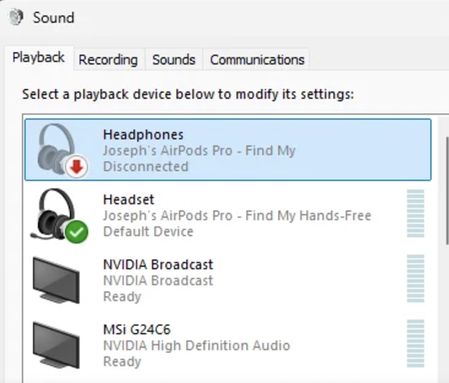
It sounds like your headphones might be defaulting to the "hands-free" audio profile instead of the high-quality stereo one, which often happens with Bluetooth devices. Check your audio settings:
Right-click the sound icon in the taskbar and select Sound settings.
Under Output, select your Razer Opus and ensure it’s set to the Stereo profile, not the "hands-free" mode.
If that doesn't help, it might be a driver issue related to the Insider build. Have you tried updating or reinstalling your Bluetooth drivers? Also, if the Dev Channel is causing too much trouble, maybe consider a fresh install to the stable release—it’s a bit of a hassle but might save you more pain long-term! 😅