Forum Discussion

Amazon App store is not DOWNLOADING
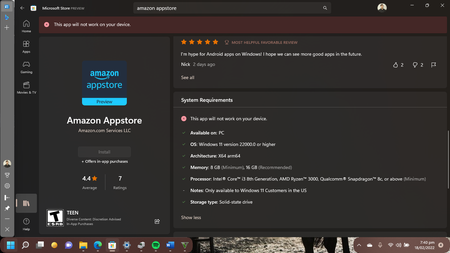
- Feb 19, 2022
AFAIK, the Amazon AppStore is only available to customers in US as of this writing. It may be available to other regions later. This is why you're getting this error. Check your device region settings. Also, refer other suggestions provided here:
https://www.kapilarya.com/fix-this-app-will-not-work-on-your-device-error-with-amazon-appstoreHope this helps!
Note: Included link in this reply refers to blog post by a trusted Microsoft MVP.

AFAIK, the Amazon AppStore is only available to customers in US as of this writing. It may be available to other regions later. This is why you're getting this error. Check your device region settings. Also, refer other suggestions provided here:
https://www.kapilarya.com/fix-this-app-will-not-work-on-your-device-error-with-amazon-appstore
Hope this helps!
Note: Included link in this reply refers to blog post by a trusted Microsoft MVP.

But on my laptop, the Hyper v option is not available in (turn on or off window's features ) But in system info
same option appearing in last which you share in the screenshot
Buddy, I really need your precious solution
My Microsoft account version is (2202.1402.2.0)
My processor is
AMD Ryzen 3 2200U with Radeon Vega Mobile Gfx, 2500 Mhz, 2 Core(s), 4 Logical
Version 10.0.22557 Build 22557
OS Name Microsoft Windows 11 Home
System Model Inspiron 3585
BIOS Version/Date Dell Inc. 1.4.0, 29/05/2019
Thanks
- KapilAryaFeb 24, 2022MVPCheck if you can enable Hyper-V with this PowerShell command:
DISM /online /Enable-Feature /All /FeatureName:Microsoft-Hyper-V
Also suggest you to confirm regional settings set to US.