Forum Discussion

jamesratcliffe
Aug 04, 2021Copper Contributor
On-premises network connection
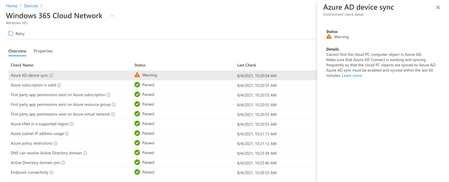
I have a DC setup ina Azure, with AD connect installed and working (as far as i can tell) however the On-premises Network Connection is giving me warnings, as attached. I cannot see what I ...

Steven DeQuincey Microsoft
Aug 04, 2021MicrosoftYeah you've confused the two.
Windows 365 Business isn't managed through MEM provisioning, so you don't need the OPNC at all.
The warning won't stop you creating a provisioning policy inside MEM now, but you will need to add Windows 365 Enterprise licenses to users as well as assigning them to a provisioning policy.
Windows 365 Business isn't managed through MEM provisioning, so you don't need the OPNC at all.
The warning won't stop you creating a provisioning policy inside MEM now, but you will need to add Windows 365 Enterprise licenses to users as well as assigning them to a provisioning policy.
 jamesratcliffeAug 04, 2021Copper Contributor
Steven DeQuincey I havent assigned Windows 365 business PC's I have assigned Windows 365 Enterprise PC's.
I know I need the OPNC for managing and provisioning PC's that are enterprise Pc's
- Steven DeQuinceyAug 04, 2021Sorry I mis read your original post, M365 BP, that's ok.
Is your provisioning failing? The warning on the OPNC happens because AD Sync hasn't ran while we tested the OPNC and created a computer object. Marked as a warning because it's normally just an AD Connect timing issue rather than a hard failure.- jamesratcliffeAug 04, 2021Copper Contributor
Steven DeQuincey I I have mananged to get one PC provisioned, however there are 2 more that are just sitting at provisioning for nearly 2 hours now:
I can see the object being created in the DC, but it just doesn't seem to be reliable.
Even after leaving it all last night, when doing checks this morning the OPNC test came back with the same warning.