Forum Discussion

Does Windows Autopatch support DIY build PCs?
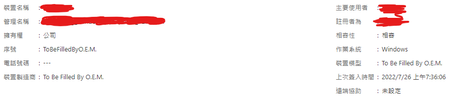
- Sep 22, 2022Alber - Today we use serial number, manufacturer and model to differentiate devices that are generated from device emulators we currently support (device emulators that generate serial numbers, manufacturer and model). We're considering a change on that logic in a near future to allow devices to be registered with Autopatch even no serial number, manufacturer or model is generated by the device emulator. Stay tuned for that change.


 Microsoft
Hi Alber
For detailed information on the overall device registration process for Autopatch, see Device registration overview - Windows Deployment | Microsoft Docs.
If your devices meet the requirements and you are still seeing differing results as you have described, please submit a support request and the Windows Autopatch Service Engineering Team can investigate further.

Hi RichardLian
According to the docs, a duplicate serial number is not accepted by Autopatch.
I guess I registered the two devices (with the same serial number) before the check mechanism be added.
Now I still have one of them stay in Autopatch and works fine.
Really wonder why we need serial number, model and manufacturer of a device to use Autopatch.
Nonsense to me.
- Andre Della MonicaSep 22, 2022Alber - Today we use serial number, manufacturer and model to differentiate devices that are generated from device emulators we currently support (device emulators that generate serial numbers, manufacturer and model). We're considering a change on that logic in a near future to allow devices to be registered with Autopatch even no serial number, manufacturer or model is generated by the device emulator. Stay tuned for that change.
 harrisam735Jan 23, 2023Copper Contributor
Andre Della Monica Hello Andre - Any update on this? We have a handful of custom-built surveillance servers that are running into this issue.
- Andre Della MonicaFeb 01, 2023Hi harrisam735. No updates yet. For now, I recommend you use a device emulator that generates serial number, manufacturer and model.