Forum Discussion

Anonymous
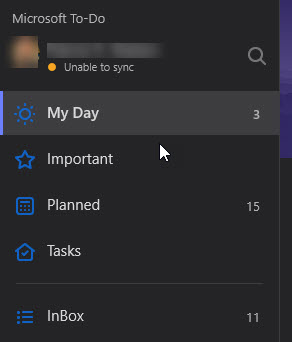
Jan 22, 2019Microsoft ToDo not syncing (UWP app)
I have recently switched over to Microsoft ToDo (from Todoist) and am using my Office 365 work account hosted by GoDaddy. I am getting used to it and I think it might meet my needs without paying for...

Jan 22, 2019
Hi Deleted
Thanks for raising. Would recommend looking at this string
https://techcommunity.microsoft.com/t5/Microsoft-To-Do/Sync-Problems/td-p/146864
As the article suggests
1. Adding "Microsoft To-Do*" and "GriffinRestClient*" to our EWS allow list may fix it
2. App had old lists in it that were no longer on the website. I had not synced it for several months. By deleting all my lists and signing out and then recreating them everything began syncing again. May fix it.
3. Contact the support team via the in-app option found in the settings. For the web app, you can click "Copy Session ID" found in the To-Do settings page and paste it in a support ticket, which you can open here: https://todosupport.helpshift.com/a/microsoft-to-do/?p=web&contact=1
Hope that helps to resolve. Let me know how you get on.
Best, Chris
Thanks for raising. Would recommend looking at this string
https://techcommunity.microsoft.com/t5/Microsoft-To-Do/Sync-Problems/td-p/146864
As the article suggests
1. Adding "Microsoft To-Do*" and "GriffinRestClient*" to our EWS allow list may fix it
2. App had old lists in it that were no longer on the website. I had not synced it for several months. By deleting all my lists and signing out and then recreating them everything began syncing again. May fix it.
3. Contact the support team via the in-app option found in the settings. For the web app, you can click "Copy Session ID" found in the To-Do settings page and paste it in a support ticket, which you can open here: https://todosupport.helpshift.com/a/microsoft-to-do/?p=web&contact=1
Hope that helps to resolve. Let me know how you get on.
Best, Chris