Forum Discussion

List owner does not appear in the list of members
 Feb 12, 2020
Muffsen
Sorry if my post is a duplicate , but I just saw it was removed , dont know why :I noticed there is a difference between some lists I had shared. Some displayed a number next to the share icon. Some did not, those lists were not behaving as they should. I could also not assign tasks as described above. I had tried to re-share the list in the previous weeks many times to no avail.
This is what I did (on v2.11 @ Feb 12th 2020)
- Go to a shared list, click the share (people) icon, click stop sharing at the bottom
- Then I went to a device of my wife and double-checked the list was gone. In one instance I had to delete it. (beware see my comment down below)
- Then on my device I shared the list again with my wife via mail
- On my wife's device I joined the list from mail
Afterwards I noticed the number 2 was displayed next to share icon + my wife was displayed in the share list , and I was able to assign tasks. In some lists I noticed some duplicates but luckily that was fixed quickly.
Before I did this :
- On my device no number next to the share icon
- On my device my wife was listed in people the list was shared with
- If I made an update, sometimes it would synchronize sometimes not
- On her device, no number next to share icon- On her device I was not listed in people the list was shared with
- If she made an update, sometimes it would synchronize sometimes not.
Also a manual sync did nothing for some tasks/lists, but worked for others very strange. I also noticed if we would uncheck tasks which were checked off on our wunderlist before migration, that would never synch through. New tasks would sometimes.
I checked the release notes for v2.11 and it showed they fixed an error for lists imported from Wunderlist (which was the case for all my lists). I think the key here is to completely stop sharing first , and verify the list is gone on the device of the person you are sharing with and than re-share in order to get it working properly now. If after you stop sharing the list is still there ,on the other persons device, they can delete it probably.
If the message is displayed : "Are you sure you want to delete list it will be removed for all users", the share is still active. WARNING : If you continue you will lose your data. If the message is not displayed this means the list is now existing on its own. Not to worry the owner of the list can then re-share the list.
I think this entire thing might be due to ToDo migrating the (shared wunderlist) lists for me and my wifes devices and seeing them afterwards as independent lists. Once we then shared the two individual (previously shared wunderlist) lists , something went wrong in previous version (dont recall when I converted to To Do)...
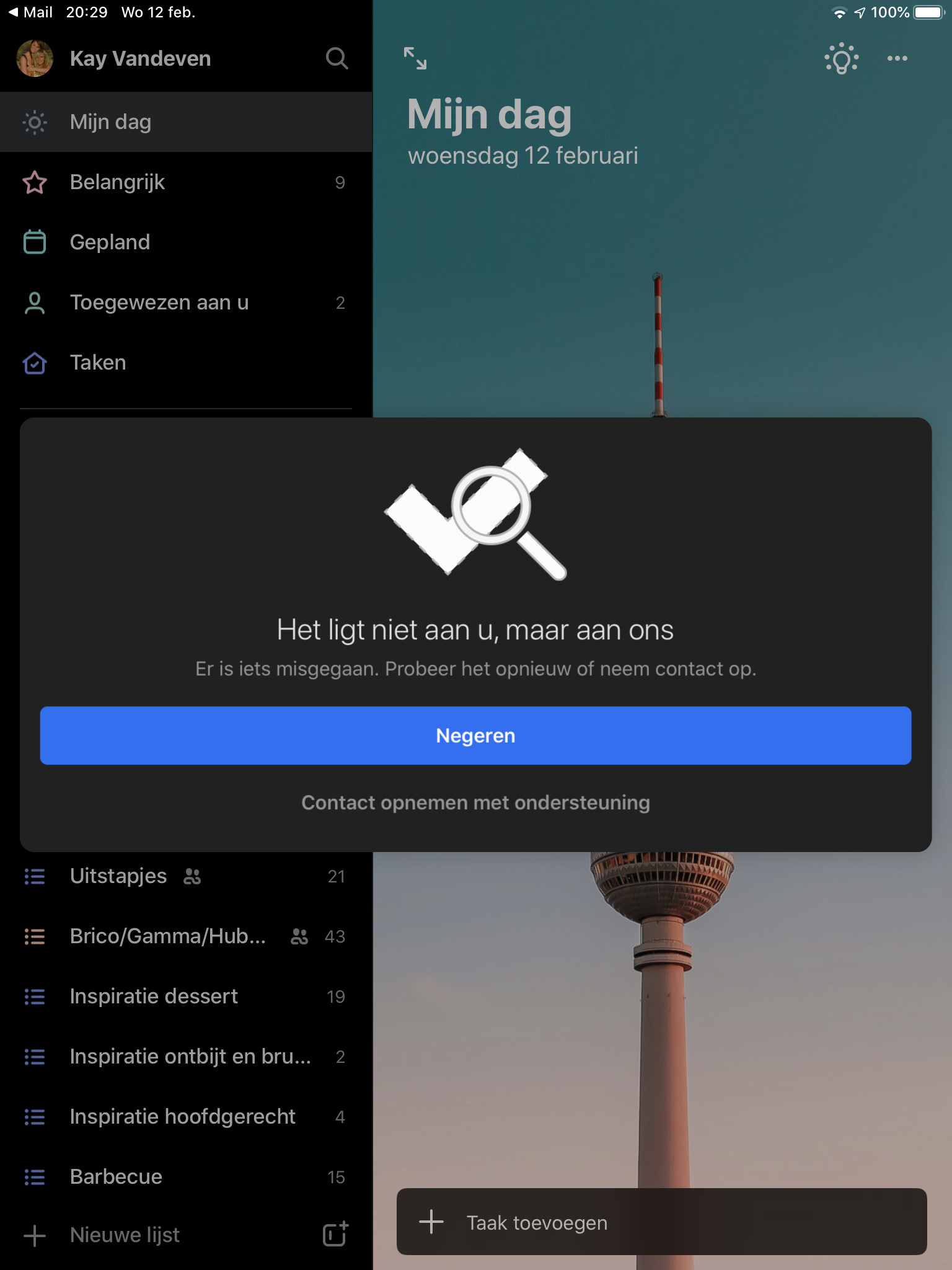
There is one list I am having trouble with though, it keeps telling my wife is unable to join the list.
I have attached screenshots, second one translates to "It is not you , it's us. Something went wrong, please try again or contact us. Ignore, Contact support"
EDIT: for this final issue, i ended up creating a new shared list, and moving all my tasks. Deleted old list.

Muffsen
Sorry if my post is a duplicate , but I just saw it was removed , dont know why :
I noticed there is a difference between some lists I had shared. Some displayed a number next to the share icon. Some did not, those lists were not behaving as they should. I could also not assign tasks as described above. I had tried to re-share the list in the previous weeks many times to no avail.
This is what I did (on v2.11 @ Feb 12th 2020)
- Go to a shared list, click the share (people) icon, click stop sharing at the bottom
- Then I went to a device of my wife and double-checked the list was gone. In one instance I had to delete it. (beware see my comment down below)
- Then on my device I shared the list again with my wife via mail
- On my wife's device I joined the list from mail
Afterwards I noticed the number 2 was displayed next to share icon + my wife was displayed in the share list , and I was able to assign tasks. In some lists I noticed some duplicates but luckily that was fixed quickly.
Before I did this :
- On my device no number next to the share icon
- On my device my wife was listed in people the list was shared with
- If I made an update, sometimes it would synchronize sometimes not
- On her device, no number next to share icon
- On her device I was not listed in people the list was shared with
- If she made an update, sometimes it would synchronize sometimes not.
Also a manual sync did nothing for some tasks/lists, but worked for others very strange. I also noticed if we would uncheck tasks which were checked off on our wunderlist before migration, that would never synch through. New tasks would sometimes.
I checked the release notes for v2.11 and it showed they fixed an error for lists imported from Wunderlist (which was the case for all my lists). I think the key here is to completely stop sharing first , and verify the list is gone on the device of the person you are sharing with and than re-share in order to get it working properly now. If after you stop sharing the list is still there ,on the other persons device, they can delete it probably.
If the message is displayed : "Are you sure you want to delete list it will be removed for all users", the share is still active. WARNING : If you continue you will lose your data. If the message is not displayed this means the list is now existing on its own. Not to worry the owner of the list can then re-share the list.
I think this entire thing might be due to ToDo migrating the (shared wunderlist) lists for me and my wifes devices and seeing them afterwards as independent lists. Once we then shared the two individual (previously shared wunderlist) lists , something went wrong in previous version (dont recall when I converted to To Do)...
There is one list I am having trouble with though, it keeps telling my wife is unable to join the list.
I have attached screenshots, second one translates to "It is not you , it's us. Something went wrong, please try again or contact us. Ignore, Contact support"
EDIT: for this final issue, i ended up creating a new shared list, and moving all my tasks. Deleted old list.

Thanks for your help. This approach solved the problem. Now I have apply this procedure to all lists with this issue.