Forum Discussion

NJKA001
Aug 14, 2023Brass Contributor
Cannot delete organisation from Teams
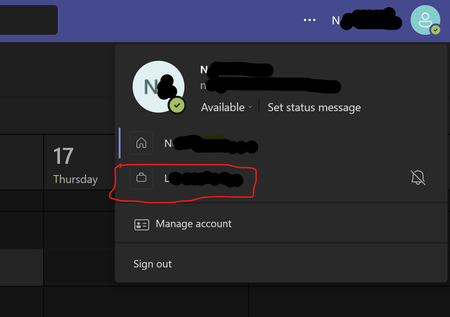
Hi, It appears to be impossible to delete an organization from Teams Please see the picture below. I am unable to remove the organization beginning with L. I have used my personal emai...
 Sep 18, 2025
Hey! Here is a quick step-by-step!
- Go to myapps.microsoft.com.
- Sign in with your personal Microsoft account.
- Click your profile picture (top-right) → My Account.
- Scroll to Organizations.
- Click Manage Organizations.
- Find the organization you want to leave and click Leave Organization.
If you're still stuck and you want to do a bit of a hard reset, you might try deleting local cache?
But the best bet is contacting the admins in the organization and asking them to remove you
HarryP
Sep 18, 2025Brass Contributor
Hey! Here is a quick step-by-step!
- Go to myapps.microsoft.com.
- Sign in with your personal Microsoft account.
- Click your profile picture (top-right) → My Account.
- Scroll to Organizations.
- Click Manage Organizations.
- Find the organization you want to leave and click Leave Organization.
If you're still stuck and you want to do a bit of a hard reset, you might try deleting local cache?
But the best bet is contacting the admins in the organization and asking them to remove you

Trevsta
Dec 09, 2025Copper Contributor
Follow HarryP's instructions up Leave Organisation.
However, I still had to complete a few additional steps:
- Quit out of Teams completely (right-click the Teams icon in the system tray and Quit).
- Open File Explorer and go to %appdata%\Microsoft\Teams
- Delete these folders if they exist:
- Cache
- blob-storage
- databases
- GPUCache
- IndexedDB
- Local Storage
- tmp
- Restart Teams and sign back in.