Forum Discussion

Cannot delete organisation from Teams
 Sep 18, 2025
Hey! Here is a quick step-by-step!
- Go to myapps.microsoft.com.
- Sign in with your personal Microsoft account.
- Click your profile picture (top-right) → My Account.
- Scroll to Organizations.
- Click Manage Organizations.
- Find the organization you want to leave and click Leave Organization.
If you're still stuck and you want to do a bit of a hard reset, you might try deleting local cache?
But the best bet is contacting the admins in the organization and asking them to remove you

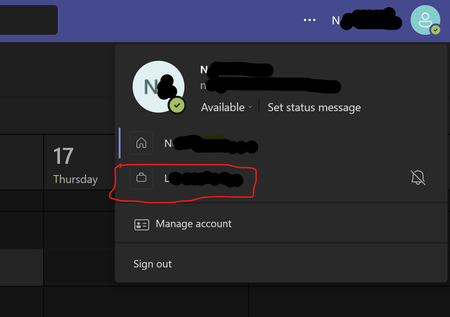
Hey, is yours an issue with the account showing at the top right-corner when you select your profile, or is it in the list of accounts to choose when you sign in? The latter is a local cache issue :(

The issue is that when I run my Teams desktop client, an old account from a previous customer engagement is still listed in the available accounts. It is flagged with a warning triangle, which overrides the unread messages count on the Teams icon. It is definitely a local issue since online Teams does not list the account. If it is a cache issue, it is a veeery persistent cache - I've been out of that assignment for months by now 🙂. Any idea how to clear the cache?
- HelloBenTeohAug 30, 2025Bronze Contributor
Ah! Red triangle might mean you’re in the same issue here then. Interesting that it doesn’t show when you’re signed in via the web. Is it your personal account?