Forum Discussion

NJKA001
Aug 14, 2023Brass Contributor
Cannot delete organisation from Teams
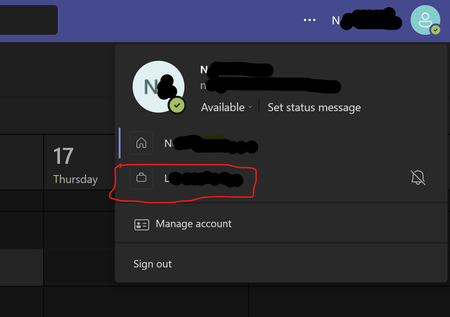
Hi, It appears to be impossible to delete an organization from Teams Please see the picture below. I am unable to remove the organization beginning with L. I have used my personal emai...

Vasek_Jansa
Apr 12, 2024Copper Contributor
HelloBenTeoh Hello Ben and all, what do I need to do to wipe an org out from my teams desktop app? Apparently it sill resides somewhere on my PC, because it disappeared from the web app, after I'd left the org in my account settings. In the desktop app it visually resulted in deletion of the org label. See my screenshots. Am on Windows 11 / latest version of MS teams. Thanks.
web app:
desktop app:
receive errors switching to the "ghost" org

jabhawkBDF
Jun 10, 2024Copper Contributor
When this happens what I found fixes the issue is to clear the local Teams data.
1. Select Apps > Installed apps, and then type Microsoft Teams in the search box.
2. Locate the New Microsoft Teams app from the results, select the More options button (...) on the right, and then select Advanced options.
3. In the Reset section, select Reset.
4. Restart Teams.
On restart the valid org's attached to the account are reconnected.
1. Select Apps > Installed apps, and then type Microsoft Teams in the search box.
2. Locate the New Microsoft Teams app from the results, select the More options button (...) on the right, and then select Advanced options.
3. In the Reset section, select Reset.
4. Restart Teams.
On restart the valid org's attached to the account are reconnected.
- vanroanJun 11, 2024Copper Contributor
Thank you, but unfortunately that didn't work for me
- Vasek_JansaJun 11, 2024Copper Contributor
vanroan have you tried logging out from MS teams and logging back in?
- vanroanJun 11, 2024Copper ContributorYes, fully logged out...refreshed everything...even had problems restarting teams afterwards, but the invalid org remains unfortunately