Forum Discussion

Cannot delete organisation from Teams
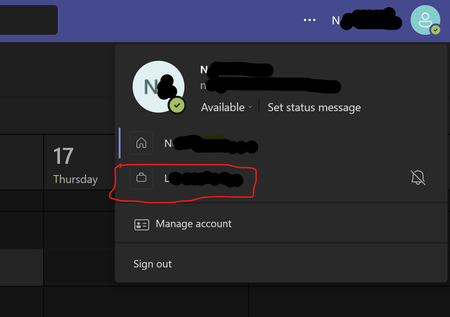

Hey, it comes up a lot. Here are the steps to take:
To leave an organisation with your personal account:
- Sign in to https://myapps.microsoft.com
- At the top-left, select the arrow and go to My Account
- Select Manage Organizations
Here, you'll see a list of organizations connected to your account.
- Select Leave next to the organization you want to leave
- Confirm that you want to leave
What if I can't leave?
In some cases, you may not be able to leave the organisation. This is likely due to a setting that they have that disables the ability for external users to leave the organisation. You can read more about this on the Microsoft Support page.

HelloBenTeoh Hello Ben and all, what do I need to do to wipe an org out from my teams desktop app? Apparently it sill resides somewhere on my PC, because it disappeared from the web app, after I'd left the org in my account settings. In the desktop app it visually resulted in deletion of the org label. See my screenshots. Am on Windows 11 / latest version of MS teams. Thanks.
web app:
desktop app:
receive errors switching to the "ghost" org
 ChristophK10Oct 08, 2024Copper ContributorI have the same issue with the orphan organisation that once existed in my own microsoft environment.
How is it possible to delete it? jabhawkBDFJun 10, 2024Copper ContributorWhen this happens what I found fixes the issue is to clear the local Teams data.
1. Select Apps > Installed apps, and then type Microsoft Teams in the search box.
2. Locate the New Microsoft Teams app from the results, select the More options button (...) on the right, and then select Advanced options.
3. In the Reset section, select Reset.
4. Restart Teams.
On restart the valid org's attached to the account are reconnected.- vanroanJun 11, 2024Copper Contributor
Thank you, but unfortunately that didn't work for me
- Vasek_JansaJun 11, 2024Copper Contributor
vanroan have you tried logging out from MS teams and logging back in?
 HagelSternApr 30, 2024Copper Contributor
Hi there,
have you tried to uninstall Microsoft Teams and then reinstall it? Furthermore, you can also give the reset option via system settings/apps a try to remove any local information.
Regards,
Hagel
- Vasek_JansaApr 30, 2024Copper Contributor
HagelStern eventually, an easier fix worked. I simply logged out from MS Teams and after I'd logged back in, it was gone 😉