Forum Discussion

NJKA001
Aug 14, 2023Brass Contributor
Cannot delete organisation from Teams
Hi, It appears to be impossible to delete an organization from Teams Please see the picture below. I am unable to remove the organization beginning with L. I have used my personal emai...
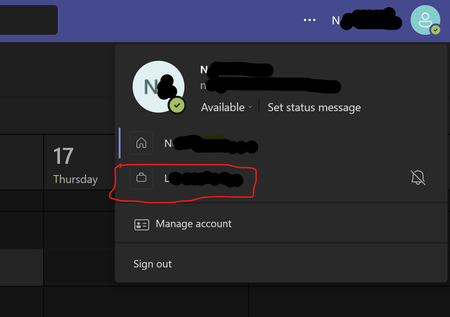

HelloBenTeoh
Aug 15, 2023Bronze Contributor
Hey, it comes up a lot. Here are the steps to take:
To leave an organisation with your personal account:
- Sign in to https://myapps.microsoft.com
- At the top-left, select the arrow and go to My Account
- Select Manage Organizations
Here, you'll see a list of organizations connected to your account.
- Select Leave next to the organization you want to leave
- Confirm that you want to leave
What if I can't leave?
In some cases, you may not be able to leave the organisation. This is likely due to a setting that they have that disables the ability for external users to leave the organisation. You can read more about this on the Microsoft Support page.

RichPasty
Mar 15, 2024Copper Contributor
I know this is an older thread, but when I do this, the organisation i want to leave is not listed.
In the Teams Client, it has an orange triangle with exclaimation mark in it. When clicking it, I get a message "Oops! We have run into issues while switching to the selected account or org."
The organisation no longer exists, the azure tenant has been removed.
Is there something i can do in powershell or from our Admin centre?
In the Teams Client, it has an orange triangle with exclaimation mark in it. When clicking it, I get a message "Oops! We have run into issues while switching to the selected account or org."
The organisation no longer exists, the azure tenant has been removed.
Is there something i can do in powershell or from our Admin centre?
 Vasek_JansaApr 12, 2024Copper Contributoryea, same here, added some screenshots in my reply to visually document the glitch
 jabhawkBDFApr 08, 2024Copper Contributor
RichPasty I have the same issue with a domain that was stolen from me. I was able to close out all the MS tools and forced my acocunt to leave the org but my work desktop stil shows I have the unwanted org.
Did you get any place with your situation?