Forum Discussion

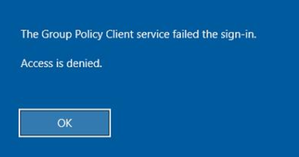
WVD logon issues. The Group Policy Client Service failed the sign-in. Access is denied.


 alozzyDec 29, 2022Copper Contributor
I'm hopeful that upgrading from "FSLogix 2201 hotfix 1 (2.9.8171.14983)" to "FSLogix 2210 (2.9.8361.52326)" resolves the issue for me.
In particular, this bug fix note for hotfix 2 (2.9.8228.50276) sounds promising:
"Resolved an issue during profile cleanup where user registry hives would be removed regardless of the FSLogix local group exclusions."
In my case, the affected user is a member of an AD group that is in turn a member of the local "FSLogix Profile Exclude List" group. So, it makes sense that fslogix is interfering with the user's hive despite being a member of that exclusion group - because of that bug.
- jszabo_98Dec 16, 2022Copper Contributor
I successfully predicted this happening by looking for users with a non-zero refcount, and seeing if they were actually logged in. I tried to post some powershell, but I don't see it yet.
- jszabo_98Dec 16, 2022Copper Contributor
I was able to predict the problem happening with this script. I checked the non-zero usernames against who was logged in with the 'quser' command. Code formatting doesn't work?
# profilecheck.ps1
function sid2user {
param($id)
$SID = New-Object System.Security.Principal.SecurityIdentifier($id)
$objUser = $SID.Translate([System.Security.Principal.NTAccount])
$objUser.Value
}get-itemproperty HKLM:\SOFTWARE\Microsoft\Windows` NT\CurrentVersion\ProfileService\References\* refcount |
select @{n='Sid';e={$_.pschildname}},@{n='User';e={sid2user $_.pschildname}},@{n='Refcount';e={$_.refcount[0]}}# example:
.\profilecheck.ps1 | ? refcount
Sid User Refcount
--- ---- --------
S-2-4-11-3423303271-1025932689-3187700767-574700 jszabo_98 1