Forum Discussion

Unable to launch the Surface DUO Emulator with Visual Studio
- Mar 20, 2020
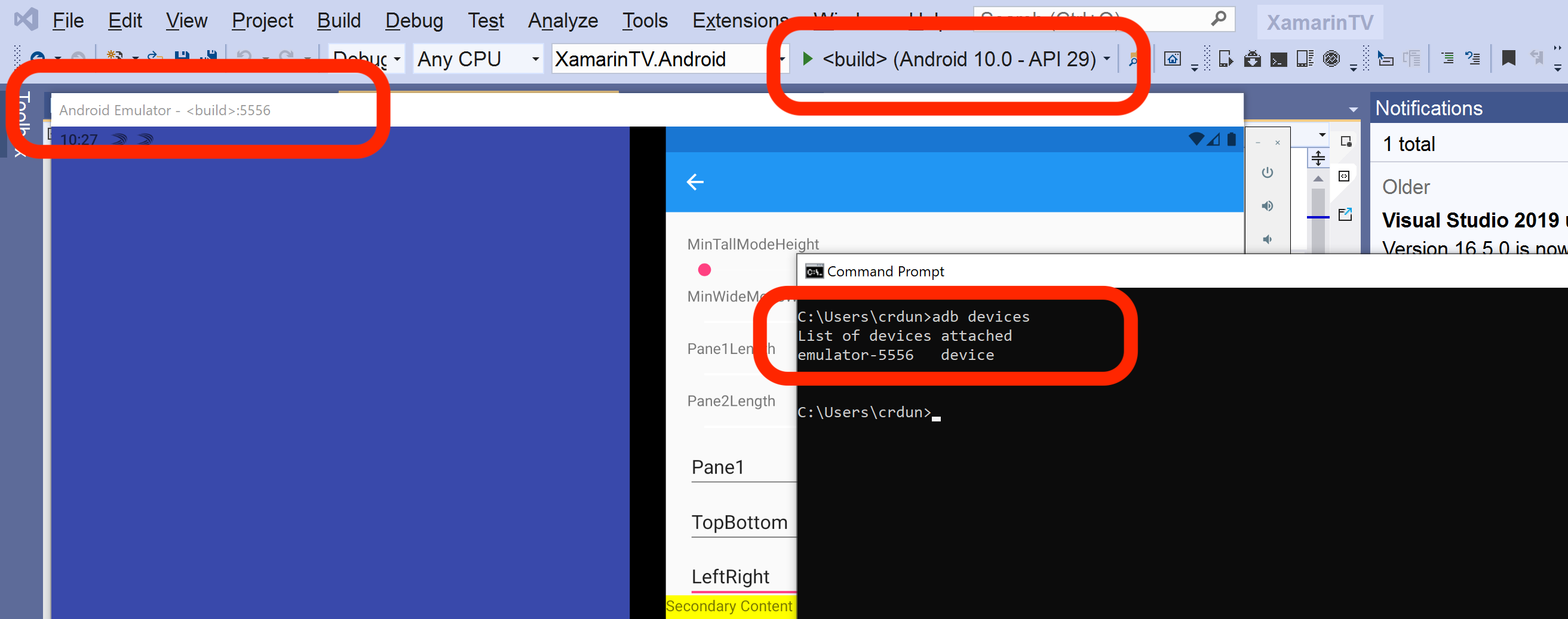
Sivaprasad. G if you see the Surface Duo emulator, check the port showing in the title bar (it will say something like "Android Emulator - <build>:5556").
That should match the post listed by adb devices, even though the rest of the name may not match exactly. I've attached a screenshot of how it looks for me.
I'll add that whenever I use the Visual Studio batch file (run_vs.bat), I get a low-numbered port (like 5554 or 5556). I notice in your list it's 5578. Check that your batch file does not specify the -ports parameter (and also confirm the ANDROID_SDK_LOCATION is the one in C:\Program Files (x86\Android\android-sdk).

 Microsoft
Hi Sivaprasad. G , in the two batch files you shared above script that works for android studio.docx, the second script differs slightly from the first, in that a lot of the command line parameters are not "quoted". For example, the first one:
"%EMULATOR%" -verbose -accel auto %* -ports 5575,5579 -sysdir "%DIRNAME%\bin" -kernel "%DIRNAME%\bin\kernel-ranchu" -datadir "%DIRNAME%\bin\data" -initdata "%DIRNAME%\bin\userdata.img" -vendor "%DIRNAME%\bin\vendor-qemu.img" -system "%DIRNAME%\bin\system-qemu.img" -initdata "%DIRNAME%\bin\userdata.img" -data "%DIRNAME%\bin\userdata.img"
versus the second one:
"%EMULATOR%" -verbose -accel auto %* -sysdir %DIRNAME%\bin -kernel "%DIRNAME%\bin\kernel-ranchu" -datadir %DIRNAME%\bin\data -initdata %DIRNAME%\bin\userdata.img -vendor %DIRNAME%\bin\vendor-qemu.img -system %DIRNAME%\bin\system-qemu.img -initdata %DIRNAME%\bin\userdata.img -data %DIRNAME%\bin\userdata.img
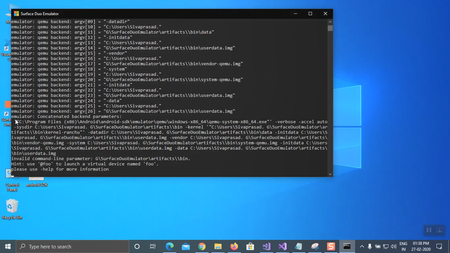
Notice how the second one is missing "" around "%DIRNAME%\bin\data" and most of the other parameters? For most users, this does not cause an issue, but because your user folder has a space in it "C:\Users\Sivaprasad. G\" (as shown in the log file you shared), the space causes the command line to think there are two separate parameters, and you get an error:
invalid command-line parameter: G\SurfaceDuoEmulator\artifacts\\bin
which is because of the space before the G. Having quotes around the parameters that include %DIRNAME% should fix this issue with that .bat file.
Let us know if that helps?

Hello Craig_Dunn ,
Thank you for the detail information and support , After changing the script, I can successfully launch the emulator by clicking the run.bat, However when I tried to run the sample app (surface duo Xamarin sample apps) I didn't find the Surface Duo emulator in option, (even I build, the solution )
I also tried following the steps
- removed the -ports 5575,5579 in run.bat ,
- replaced run.bat with the original xamarin script and modified the part ANDROID_PRODUCT_OUT as run_androidstudio.bat, the run.bat not throw any error , its successfully launch the emulator.
The same thing applied to run_vs.bat, and I can directly launch the emulator by clicking run_vs.bat
However still I wasn't able to successfully connect the emulator to Visual studio.
- Craig_DunnMar 19, 2020
Sivaprasad. G after you start the emulator with run_vs.bat, can you do adb devices in the command line and confirm that the Surface Duo emulator shows up there? The Surface Duo emulator might not automatically appear in the Visual Studio menu by default, but if it is shown in the adb devices list, then it should also be available in Visual Studio.
- Mar 20, 2020
Hi Craig_Dunn ,I am unable to type or paste the "adb devices" on the command line after the emulator start, I tried many times, the run_vs.bat CMD is no more accepting any input once it started. Please advise, Thanks.
- Craig_DunnMar 20, 2020
Sivaprasad. G you can start a new command window and use adb devices there - you are correct the one that started the emulator will not accept further input.
- tscholzeMar 15, 2020Iron Contributor
That's sad Sivaprasad. G,
just as a guess, did you tried to launch VS as an administrator? Do you use any security software that may block some inner computer connections?
- Mar 15, 2020
tscholze Thanks for the suggestion, but i couldn't figure out the solution yet. I use the windows security.
- tscholzeMar 19, 2020Iron Contributor
Sivaprasad. G That's sad. Please let us know if you found a fix! I cross my fingers for you. 🙂