Forum Discussion

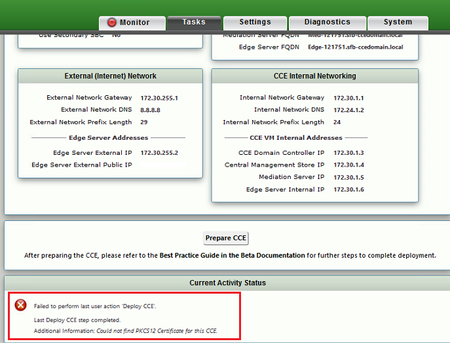
Sonus SFB CCE Certificate Issue

- Jul 05, 2017
Found a solution to fix it.
There are two options to address this issue;
1. Upgrade current Sonus default Firmware 6.1.0 to to latest stable version 6.1.2 (Sonus mentioned in its Release Note that this is a known issue) OR
2. Follow below steps
Generate CSR from Sonus, import using Base64 certificate.2. Submit it to your public SSL certificate service provider
3. Import the certificate (*.cer) you downloaded from your public SSL provider into your PC ( any PC) and export as Base64 format.
4. Open exported name.cert Base64 certificate in Notepad, copy all text, paste it in Sonus.
5. Re-prepare CCE , it went through successfully like a magic.
For those who prefer to upgrade Sonus Firmware, please let me know if you all need detail instructions and steps.

Found a solution to fix it.
There are two options to address this issue;
1. Upgrade current Sonus default Firmware 6.1.0 to to latest stable version 6.1.2 (Sonus mentioned in its Release Note that this is a known issue) OR
2. Follow below steps
Generate CSR from Sonus, import using Base64 certificate.
2. Submit it to your public SSL certificate service provider
3. Import the certificate (*.cer) you downloaded from your public SSL provider into your PC ( any PC) and export as Base64 format.
4. Open exported name.cert Base64 certificate in Notepad, copy all text, paste it in Sonus.
5. Re-prepare CCE , it went through successfully like a magic.
For those who prefer to upgrade Sonus Firmware, please let me know if you all need detail instructions and steps.