Forum Discussion

Multiple chats sessions with same contact in S4B window ?
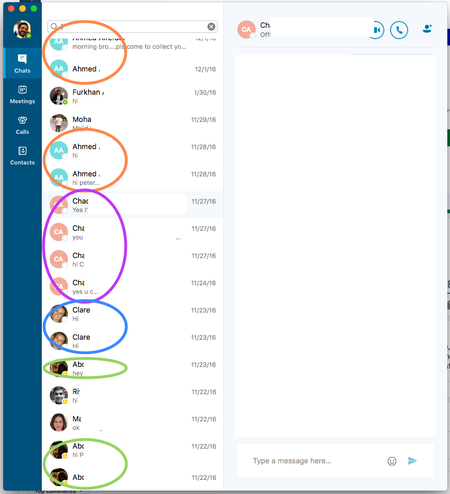


Unfortunately, this is not a simple fix. Skype (consumer) is built on a completely different infrastructure than Skype for Business. SfB treats every conversation as an independent object without considering who that conversation is with or any previous conversations between that individual or group of people. To create a single list in the app requires stitching together many conversations or parts of conversations, which can overlap or have multiple conversations active at the same time. Doing this in the app also has performance issues that we need to solve, since you wouldn't want to wait 5 seconds each time you open a chat window. I know that the technical details are not important to you, but this is definitely not a simple fix.
Phil.
- Peter OkornMay 22, 2018Brass Contributor
Hi Phil,
I think the complaint here is that the idea or concept has been missed or ignored by MS. Who wants to have their conversation history in 85 different threads? How about sharing files, or referencing links, or whatever else it is people do? at this point, if you haven't already noticed that WhatsApp is one of the world's most successful chat solution it's because not only is it singular, but contains all required content and history. Not only is that feature useful in a personal world, but from a business standpoint it offers reliability and legal referral. I just find it, or should say we the community, find it astounding that the brains at MS haven't sovled this issue already.
That said, can you confirm whether the reason behind not solving this in SfB is because you'll abandon it for teams?
- Jörg von der OheMay 25, 2018Iron Contributor
https://support.office.com/en-us/article/office-insider-releases-for-skype-for-business-on-mac-7f190a71-2b56-4914-8044-668582997619?ui=en-US&rs=en-US&ad=US
Looks like the latest insider build should have the feature, try it out tomorrow
 AnonymousMay 25, 2018
.
 Paul SmithMay 07, 2018Copper Contributor
Following this group. Seems this function works in S4B Windows.
Anyway -- is there a way to highlight multiple "split" conversations and delete? Or do i have to delete them one by one? Tried shift-mouse click, control-mouse click. Doesn't work...
Same issue, I end up with 50 individual conversations at the end of the day and it's a waste of time to delete each one by one.
 Linda HuffakerMay 21, 2018Copper Contributor
May 21, 2018 - I would like to know if the multiple threads for one contact has been resolved for Skpe for Business? Yes or no, please.
- Jörg von der OheMay 21, 2018Iron ContributorNo it isn't...
 Braedon SziklasiFeb 05, 2018Brass Contributor
"Skype (consumer) is built on a completely different infrastructure than Skype for Business. SfB treats every conversation as an independent object without considering who that conversation is with or any previous conversations between that individual or group of people"
While I appreciate the transparency, and it helps to explain why the team is struggling to push this fix, it seems like quite the oversight in the SfB infrastructure. Additionally, stitching together conversations retroactively seems like a band-aid fix. Why not resolve the underlying issue with the SfB infrastructure, in the same way the consumer application does?

