Forum Discussion

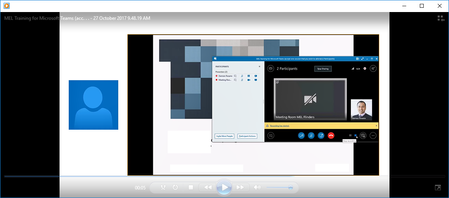
How do I only record my shared desktop screen and not the video feed from other participants?
- Nov 02, 2017
Hi Shane
The issue was happening on my laptop screen when presenting, but I have found a way to get my solution.
By setting all participants as Attendees and also disabling their video feeds, I have found that when I record the meeting it only shows the shared screen I am presenting.
I did notice that when someone had typed out a question, it appeared on the side of the video, but the way to fix that for me might be to disable IM and let people ask questions via audio.
Either way I have my solution which I had to trial and error to get!
Thanks again for all your input!

Thanks for your response and suggestion.
I don't have a second screen, I am doing the presentation solely from a laptop.
My presentation consists of:
1. Starting with PowerPoint slides
2. Switching to Microsoft Teams application to demo the product
3. Return to the slide show to wrap up the presentation.
Given I have a combination of your suggestions below, do you have any thoughts on how the output video can remove that self view?
Many thanks for your time and effort on this!

The only option then is to - like you do now - present your desktop, but keep things you want not seen closed or minimised.
Or, share a window - select the app you want. When finished, close it. Then repeat for the other apps. None of the attendees will then see anything else that may pop up on your own screen.
The only small issue there - which can be avoided if you explain what's going to happen - is the presentation closing, and reopening as you stop and start sharing the different apps.
That's all I can think of really.
- Damien_RosarioOct 31, 2017Silver Contributor
I appreciate your input Shane. Thanks for this.
I wish Microsoft would just have an option to let me record my shared desktop without having the presenters/speakers view avatar on the left of the Skype recording.
Maybe one for a future release?
- Shane BryanOct 31, 2017Iron Contributor
can that be controlled by the different view options? gallery etc? sorry, not logged in at the moment! :-)
we're all dual monitor snobs here so anything we don't want in the recording we just drag over to the other one. apologies if i'm a bit confused.
- Damien_RosarioNov 02, 2017Silver Contributor
Hi Shane
The issue was happening on my laptop screen when presenting, but I have found a way to get my solution.
By setting all participants as Attendees and also disabling their video feeds, I have found that when I record the meeting it only shows the shared screen I am presenting.
I did notice that when someone had typed out a question, it appeared on the side of the video, but the way to fix that for me might be to disable IM and let people ask questions via audio.
Either way I have my solution which I had to trial and error to get!
Thanks again for all your input!