Forum Discussion

Riccardo_Bucca
Nov 21, 2025Copper Contributor
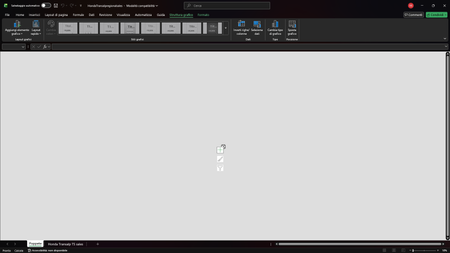
The graphics are not visualized correctly
Few days ago, I've tried to shift one of my graphic, made by very simple formulas, to an another sheet using the right button of the mouse. The result has been as the picture attached: it seems like ...
- Dec 08, 2025
Hello Riccardo_Bucca, the possible causes could be:
- Chart object shrank to near-zero size after moving: select the chart → Format > Size, or Format Chart Area > Size & Properties, and set normal width/height.
- Broken data references #REF! / still pointing to old sheet: right-click the chart, then Select Data… and re-select the correct ranges on the new sheet.
- Corrupted style/plot area: Chart Design > Reset to Match Style or Change Chart Type and pick the same type again.
If none of these work, the chart object is likely corrupted, easiest fix is to recreate the chart from the data.
Maybe..., could be simply the zoom.
The zoom is too low: in your screenshot you’re at 10%. Set zoom back to 100% and try resizing again.Hope that helps,
let us know how it goes.

maurobalsano
Dec 08, 2025MCT
Hello Riccardo_Bucca, the possible causes could be:
- Chart object shrank to near-zero size after moving: select the chart → Format > Size, or Format Chart Area > Size & Properties, and set normal width/height.
- Broken data references #REF! / still pointing to old sheet: right-click the chart, then Select Data… and re-select the correct ranges on the new sheet.
- Corrupted style/plot area: Chart Design > Reset to Match Style or Change Chart Type and pick the same type again.
If none of these work, the chart object is likely corrupted, easiest fix is to recreate the chart from the data.
Maybe..., could be simply the zoom.
The zoom is too low: in your screenshot you’re at 10%. Set zoom back to 100% and try resizing again.
Hope that helps,
let us know how it goes.

Riccardo_Bucca
Dec 08, 2025Copper Contributor
Thanks a lot, maurobalsano. I've fixed the problem with your solutions.