Forum Discussion

aravind_c
Jan 07, 2024Copper Contributor
No eligible environment to install the app remote asssist 365 - Hololens2 industrial edition
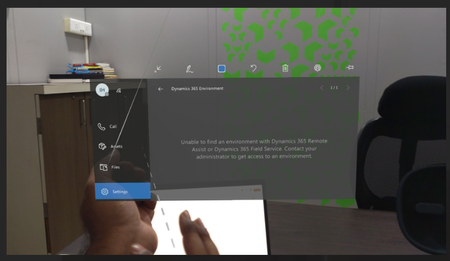
Hello , Whilst opening the remote assistant on HoloLens , it shows the below error: 2. when he tries to resolve the error through Microsoft team (Power platform admin centre) ...

Julian_Sharp
Jan 08, 2024Learn Expert
You need to
1. create a Power Platform environment with Dataverse
2. install the Dynamics 365 Remote Assist solution into the environment
See
https://learn.microsoft.com/en-us/troubleshoot/dynamics-365/remote-assist/setup-and-configuration/troubleshoot-model-driven-app-installation
https://learn.microsoft.com/en-us/power-platform/admin/create-environment
https://learn.microsoft.com/en-us/dynamics365/mixed-reality/remote-assist/requirements#dynamics-365-remote-assist-app-user
https://learn.microsoft.com/en-us/dynamics365/mixed-reality/remote-assist/ra-webapp-install
1. create a Power Platform environment with Dataverse
2. install the Dynamics 365 Remote Assist solution into the environment
See
https://learn.microsoft.com/en-us/troubleshoot/dynamics-365/remote-assist/setup-and-configuration/troubleshoot-model-driven-app-installation
https://learn.microsoft.com/en-us/power-platform/admin/create-environment
https://learn.microsoft.com/en-us/dynamics365/mixed-reality/remote-assist/requirements#dynamics-365-remote-assist-app-user
https://learn.microsoft.com/en-us/dynamics365/mixed-reality/remote-assist/ra-webapp-install
- Julian_SharpJan 08, 2024Learn Expert
You will find more help on the product community forum rather than learning forum
https://community.dynamics.com/forums/thread/?partialUrl=remoteassist