Forum Discussion

Set-SPEnterpriseSearchFileFormatState disabling built-in IFilter issue on Sharepoint SE
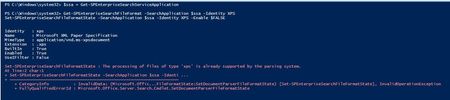

Hi Steve Zhang
I have done clean installation of Sharepoint SE on the following system.
SharePointSharePoint Build Number:
Configuration database version: 16.0.14326.20450
WindowsWindows Server Version:
SQL ServerVersion: 15.0.4198.2 |
I have installed and reinstalled Search service application multiple time.
The last time the file Default-manifest.txt isn’t generated, but we continue to have the same errors.
I don’t understand why someone don’t reproduce the issue.
The Sharepoint log I have is the following:
05/19/2022 01:14:54.29 PowerShell.exe (0x0174) 0x0B34 SharePoint Foundation PowerShell 6tf0 Medium Entering BeginProcessing Method of Set-SPEnterpriseSearchFileFormatState. f2d83ea0-3c55-80a7-bc67-f07ffc36cf53
05/19/2022 01:14:54.29 PowerShell.exe (0x0174) 0x0B34 SharePoint Foundation PowerShell 6tf0 Medium Leaving BeginProcessing Method of Set-SPEnterpriseSearchFileFormatState. f2d83ea0-3c55-80a7-bc67-f07ffc36cf53
05/19/2022 01:14:54.29 PowerShell.exe (0x0174) 0x0B34 SharePoint Foundation PowerShell 6tf0 Medium Entering ProcessRecord Method of Set-SPEnterpriseSearchFileFormatState. f2d83ea0-3c55-80a7-bc67-f07ffc36cf53
05/19/2022 01:14:54.29 PowerShell.exe (0x0174) 0x0B34 SharePoint Foundation Config DB a99o1 Medium Cloning object 0a273f54-d944-44c4-9ce2-4bc1d6ebb8eb f2d83ea0-3c55-80a7-bc67-f07ffc36cf53
05/19/2022 01:14:54.29 PowerShell.exe (0x0174) 0x0B34 SharePoint Foundation Config Cache a0ic2 Medium Refreshed SPPersistedObject with Name AppSearch1, Id 0a273f54-d944-44c4-9ce2-4bc1d6ebb8eb, Parent fec113d5-e9a2-43e2-8102-5bf18a38e2be, Version 40208. Last update info: [User: ITCONSULT\spseservice Process:OWSTIMER (2264) Machine:SPSETEST Time:May 18, 2022 07:00:55.0000 Stack trace (Thread [20] CorrelationId [589a3ea0-dc31-80a7-bc67-fdf0fe288f80]): ] f2d83ea0-3c55-80a7-bc67-f07ffc36cf53
05/19/2022 01:14:54.29 PowerShell.exe (0x0174) 0x0B34 Search Search Platform Services barqy High GetValue : object not found for (valueName = ServiceUser ProductKeyName = HKEY_LOCAL_MACHINE\SOFTWARE\Microsoft\Office Server\16.0\Search) f2d83ea0-3c55-80a7-bc67-f07ffc36cf53
05/19/2022 01:14:54.33 PowerShell.exe (0x0174) 0x0B34 Search Search Platform Services barqy High GetValue : object not found for (valueName = ServiceUser ProductKeyName = HKEY_LOCAL_MACHINE\SOFTWARE\Microsoft\Office Server\16.0\Search) f2d83ea0-3c55-80a7-bc67-f07ffc36cf53
05/19/2022 01:14:54.35 PowerShell.exe (0x0174) 0x0B34 Search Search Platform Services barqy High GetValue : object not found for (valueName = ServiceUser ProductKeyName = HKEY_LOCAL_MACHINE\SOFTWARE\Microsoft\Office Server\16.0\Search) f2d83ea0-3c55-80a7-bc67-f07ffc36cf53
05/19/2022 01:14:54.39 PowerShell.exe (0x0174) 0x0B34 Search Search Platform Services barqy High GetValue : object not found for (valueName = ServiceUser ProductKeyName = HKEY_LOCAL_MACHINE\SOFTWARE\Microsoft\Office Server\16.0\Search) f2d83ea0-3c55-80a7-bc67-f07ffc36cf53
05/19/2022 01:14:55.12 NodeRunnerAdmin1-0a273f54-d944- (0x2C3C) 0x21CC Search Search Platform Services aiyx3 Medium HostControllerClient : Connecting to host controller at address: URI[s=net.tcp,h=spsetest,p=808,r=ceres_hostcontroller_nettcp] f2d83ea0-3c55-80a7-bc67-f07ffc36cf53
05/19/2022 01:14:55.15 NodeRunnerAdmin1-0a273f54-d944- (0x2C3C) 0x21CC Search Search Platform Services aiyx3 Medium HostControllerClient : Connecting to host controller at address: URI[s=net.tcp,h=spsetest,p=808,r=ceres_hostcontroller_nettcp] f2d83ea0-3c55-80a7-bc67-f07ffc36cf53
05/19/2022 01:14:55.21 hostcontrollerservice.exe (0x1038) 0x3288 Search Search HostController ad5eq Monitorable RepositoryManager: Module Microsoft.DocParsing, Version=0.0.0.0, Culture=neutral, PublicKeyToken=0fbbedb750799a68 from Microsoft.DocParsing.dll is already installed - threadId: 22
05/19/2022 01:14:55.21 hostcontrollerservice.exe (0x1038) 0x3288 Search Search HostController ad5eq Monitorable RepositoryManager: Install of C:\Users\spseservice\AppData\Local\Temp\HostController\Downloads\1603184814\Microsoft.DocParsing.dll failed. [Cause: Module Microsoft.DocParsing, Version=0.0.0.0, Culture=neutral, PublicKeyToken=0fbbedb750799a68 from Microsoft.DocParsing.dll is already installed] - threadId: 22
05/19/2022 01:14:55.21 hostcontrollerservice.exe (0x1038) 0x3288 Search Search Platform Services agw7x Critical Repository installation failed. File: C:\Users\spseservice\AppData\Local\Temp\HostController\Downloads\1603184814\Microsoft.DocParsing.dll Error: Microsoft.Ceres.HostController.Repository.RepositoryException: Module Microsoft.DocParsing, Version=0.0.0.0, Culture=neutral, PublicKeyToken=0fbbedb750799a68 from Microsoft.DocParsing.dll is already installed at Microsoft.Ceres.HostController.Repository.RepositoryManager.Install(String moduleFileName, Boolean validateDependencies) at Microsoft.Ceres.HostController.Repository.RepositoryManager.Install(String moduleFileName)
05/19/2022 01:14:55.22 hostcontrollerservice.exe (0x1038) 0x3288 Search Search HostController ad5eq Monitorable WcfHostController: Failed to install module Microsoft.DocParsing.dll. [Cause: Module Microsoft.DocParsing, Version=0.0.0.0, Culture=neutral, PublicKeyToken=0fbbedb750799a68 from Microsoft.DocParsing.dll is already installed] - threadId: 22
05/19/2022 01:14:55.22 NodeRunnerAdmin1-0a273f54-d944- (0x2C3C) 0x21CC Search Search Platform Services aiyx4 Medium HostControllerClient : Reconnecting to host controller after exception. System.ServiceModel.FaultException: Module Microsoft.DocParsing, Version=0.0.0.0, Culture=neutral, PublicKeyToken=0fbbedb750799a68 from Microsoft.DocParsing.dll is already installed Server stack trace: at System.ServiceModel.Channels.ServiceChannel.HandleReply(ProxyOperationRuntime operation, ProxyRpc& rpc) at System.ServiceModel.Channels.ServiceChannel.Call(String action, Boolean oneway, ProxyOperationRuntime operation, Object[] ins, Object[] outs, TimeSpan timeout) at System.ServiceModel.Channels.ServiceChannelProxy.InvokeService(IMethodCallMessage methodCall, ProxyOperationRuntime operation) at System.ServiceModel.Channels.ServiceChannelProxy.Invoke(IMessage message) Exception rethrown at [0]: at System.Runtime.Remoting.Proxies.RealProxy.HandleReturnMessage(IMessage reqMsg, IMessage retMsg) at System.Runtime.Remoting.Proxies.RealProxy.PrivateInvoke(MessageData& msgData, Int32 type) at Microsoft.Ceres.CoreServices.HostController.IHostController.InstallModule(RemoteFileInfo request) at Microsoft.Ceres.CoreServices.HostController.AbstractHostControllerWrapper.WrapCall[T](Func`1 original) f2d83ea0-3c55-80a7-bc67-f07ffc36cf53
05/19/2022 01:14:55.23 hostcontrollerservice.exe (0x1038) 0x23C8 Search Search HostController ad5eq Monitorable RepositoryManager: Install of C:\Users\spseservice\AppData\Local\Temp\HostController\Downloads\645385132\Microsoft.DocParsing.dll failed. [Cause: Module contents does not conform to detected module type: System.BadImageFormatException: Could not load file or assembly 'Microsoft.DocParsing.dll' or one of its dependencies. An attempt was made to load a program with an incorrect format. File name: 'Microsoft.DocParsing.dll' ---> System.BadImageFormatException: Could not load file or assembly 'Microsoft.DocParsing.dll' or one of its dependencies. An attempt was made to load a program with an incorrect format. File name: 'Microsoft.DocParsing.dll' at System.Reflection.AssemblyName.nGetFileInformation(String s) at System.Reflection.AssemblyName.GetAssemblyName(String assemblyFile) at Microsoft.Ceres.HostController.Repository.RepositoryManager.LoadAssemblyModuleInfo(String moduleFileName) ] - threadId: 24
05/19/2022 01:14:55.23 hostcontrollerservice.exe (0x1038) 0x23C8 Search Search Platform Services agw7x Critical Repository installation failed. File: C:\Users\spseservice\AppData\Local\Temp\HostController\Downloads\645385132\Microsoft.DocParsing.dll Error: Microsoft.Ceres.HostController.Repository.RepositoryException: Module contents does not conform to detected module type: System.BadImageFormatException: Could not load file or assembly 'Microsoft.DocParsing.dll' or one of its dependencies. An attempt was made to load a program with an incorrect format. File name: 'Microsoft.DocParsing.dll' ---> System.BadImageFormatException: Could not load file or assembly 'Microsoft.DocParsing.dll' or one of its dependencies. An attempt was made to load a program with an incorrect format. File name: 'Microsoft.DocParsing.dll' at System.Reflection.AssemblyName.nGetFileInformation(String s) at System.Reflection.AssemblyName.GetAssemblyName(String assemblyFile) at Microsoft.Ceres.HostController.Repository.RepositoryManager.LoadAssemblyModuleInfo(String moduleFileName) at Microsoft.Ceres.HostController.Repository.RepositoryManager.LoadAssemblyModuleInfo(String moduleFileName) at Microsoft.Ceres.HostController.Repository.RepositoryManager.Install(String moduleFileName, Boolean validateDependencies) at Microsoft.Ceres.HostController.Repository.RepositoryManager.Install(String moduleFileName)
05/19/2022 01:14:55.23 hostcontrollerservice.exe (0x1038) 0x23C8 Search Search HostController ad5eq Monitorable WcfHostController: Failed to install module Microsoft.DocParsing.dll. [Cause: Module contents does not conform to detected module type: System.BadImageFormatException: Could not load file or assembly 'Microsoft.DocParsing.dll' or one of its dependencies. An attempt was made to load a program with an incorrect format. File name: 'Microsoft.DocParsing.dll' ---> System.BadImageFormatException: Could not load file or assembly 'Microsoft.DocParsing.dll' or one of its dependencies. An attempt was made to load a program with an incorrect format. File name: 'Microsoft.DocParsing.dll' at System.Reflection.AssemblyName.nGetFileInformation(String s) at System.Reflection.AssemblyName.GetAssemblyName(String assemblyFile) at Microsoft.Ceres.HostController.Repository.RepositoryManager.LoadAssemblyModuleInfo(String moduleFileName) ] - threadId: 24
05/19/2022 01:14:55.23 NodeRunnerAdmin1-0a273f54-d944- (0x2C3C) 0x21CC Search Document Parsing 898f4 Unexpected ParsingAdminService - Failed to save parsing configuration. Will reload configuration. System.ArgumentException: Exception while communicating with Host Controller at spsetest: Module contents does not conform to detected module type: System.BadImageFormatException: Could not load file or assembly 'Microsoft.DocParsing.dll' or one of its dependencies. An attempt was made to load a program with an incorrect format. File name: 'Microsoft.DocParsing.dll' ---> System.BadImageFormatException: Could not load file or assembly 'Microsoft.DocParsing.dll' or one of its dependencies. An attempt was made to load a program with an incorrect format. File name: 'Microsoft.DocParsing.dll' at System.Reflection.AssemblyName.nGetFileInformation(String s) at System.Reflection.AssemblyName.GetAssemblyName(String assemblyFile) at Microsoft.Ceres.HostController.Repository.RepositoryManager.LoadAssemblyModuleInfo(String moduleFileName) at Microsoft.Ceres.CoreServices.HostController.AbstractHostControllerWrapper.HandleException(Exception e) at Microsoft.Ceres.CoreServices.HostController.AbstractHostControllerWrapper.WrapCall[T](Func`1 original) at Microsoft.Ceres.ContentEngine.Parsing.Component.ParsingAdminService.CreateConfigurationPackage(String keyFile) at Microsoft.Ceres.ContentEngine.Parsing.Component.ParsingAdminService.Save() f2d83ea0-3c55-80a7-bc67-f07ffc36cf53
05/19/2022 01:14:55.25 NodeRunnerAdmin1-0a273f54-d944- (0x2C3C) 0x21CC Search Document Parsing 898f7 High ParsingAdminService - Loading format registry. View '16.0.0.0'. Format registry package '16.0.0.0'. f2d83ea0-3c55-80a7-bc67-f07ffc36cf53
05/19/2022 01:14:55.33 NodeRunnerAdmin1-0a273f54-d944- (0x2C3C) 0x21CC Search Document Parsing ajp9a Unexpected ParsingManagementAgent - Failed to disable parsing of format xps. System.ArgumentException: Exception while communicating with Host Controller at spsetest: Module contents does not conform to detected module type: System.BadImageFormatException: Could not load file or assembly 'Microsoft.DocParsing.dll' or one of its dependencies. An attempt was made to load a program with an incorrect format. File name: 'Microsoft.DocParsing.dll' ---> System.BadImageFormatException: Could not load file or assembly 'Microsoft.DocParsing.dll' or one of its dependencies. An attempt was made to load a program with an incorrect format. File name: 'Microsoft.DocParsing.dll' at System.Reflection.AssemblyName.nGetFileInformation(String s) at System.Reflection.AssemblyName.GetAssemblyName(String assemblyFile) at Microsoft.Ceres.HostController.Repository.RepositoryManager.LoadAssemblyModuleInfo(String moduleFileName) at Microsoft.Ceres.CoreServices.HostController.AbstractHostControllerWrapper.HandleException(Exception e) at Microsoft.Ceres.CoreServices.HostController.AbstractHostControllerWrapper.WrapCall[T](Func`1 original) at Microsoft.Ceres.ContentEngine.Parsing.Component.ParsingAdminService.CreateConfigurationPackage(String keyFile) at Microsoft.Ceres.ContentEngine.Parsing.Component.ParsingAdminService.Save() at Microsoft.Ceres.ContentEngine.Parsing.Component.ParsingAdminService.EnableParsing(String formatId, Boolean enable) at Microsoft.Ceres.ContentEngine.Parsing.Component.ParsingManagementAgent.EnableParsing(String formatId, Boolean enable) f2d83ea0-3c55-80a7-bc67-f07ffc36cf53
05/19/2022 01:14:55.33 NodeRunnerAdmin1-0a273f54-d944- (0x2C3C) 0x21CC Search Search Platform Services ak8y1 Medium Exception in remote service invocation (service=Admin92, method=http://schemas.microsoft.com/ceres/Parsing/2011/08/agents/IParsingManagementAgent/EnableParsing, user=ITCONSULT\nlbadmin): System.ArgumentException: Exception while communicating with Host Controller at spsetest: Module contents does not conform to detected module type: System.BadImageFormatException: Could not load file or assembly 'Microsoft.DocParsing.dll' or one of its dependencies. An attempt was made to load a program with an incorrect format. File name: 'Microsoft.DocParsing.dll' ---> System.BadImageFormatException: Could not load file or assembly 'Microsoft.DocParsing.dll' or one of its dependencies. An attempt was made to load a program with an incorrect format. File name: 'Microsoft.DocParsing.dll' at System.Reflection.AssemblyName.nGetFileInformation(String s) at System.Reflection.AssemblyName.GetAssemblyName(String assemblyFile) at Microsoft.Ceres.HostController.Repository.RepositoryManager.LoadAssemblyModuleInfo(String moduleFileName) at Microsoft.Ceres.CoreServices.HostController.AbstractHostControllerWrapper.HandleException(Exception e) at Microsoft.Ceres.CoreServices.HostController.AbstractHostControllerWrapper.WrapCall[T](Func`1 original) at Microsoft.Ceres.ContentEngine.Parsing.Component.ParsingAdminService.CreateConfigurationPackage(String keyFile) at Microsoft.Ceres.ContentEngine.Parsing.Component.ParsingAdminService.Save() at Microsoft.Ceres.ContentEngine.Parsing.Component.ParsingAdminService.EnableParsing(String formatId, Boolean enable) at Microsoft.Ceres.ContentEngine.Parsing.Component.ParsingManagementAgent.EnableParsing(String formatId, Boolean enable) at SyncInvokeEnableParsing(Object , Object[] , Object[] ) at System.ServiceModel.Dispatcher.SyncMethodInvoker.Invoke(Object instance, Object[] inputs, Object[]& outputs) at System.ServiceModel.Dispatcher.DispatchOperationRuntime.InvokeBegin(MessageRpc& rpc) at System.ServiceModel.Dispatcher.ImmutableDispatchRuntime.ProcessMessage5(MessageRpc& rpc) at System.ServiceModel.Dispatcher.ImmutableDispatchRuntime.ProcessMessage11(MessageRpc& rpc) at System.ServiceModel.Dispatcher.MessageRpc.Process(Boolean isOperationContextSet)
05/19/2022 01:14:55.34 PowerShell.exe (0x0174) 0x0B34 SharePoint Foundation PowerShell 6tf2 High System.InvalidOperationException: The processing of files of type 'xps' is already supported by the parsing system. at Microsoft.Office.Server.Search.Administration.DocumentParserAdmin.EnableParsing(String formatId, Boolean enable) at Microsoft.Office.Server.Search.Cmdlet.SetDocumentParserFileFormatState.UpdateDataObject() at Microsoft.SharePoint.PowerShell.SPCmdlet.ProcessRecord() f2d83ea0-3c55-80a7-bc67-f07ffc36cf53
05/19/2022 01:14:55.34 PowerShell.exe (0x0174) 0x0B34 SharePoint Foundation PowerShell 91ux High Error Category: InvalidData Target Object Microsoft.Office.Server.Search.Cmdlet.SetDocumentParserFileFormatState Details NULL RecommendedAction NULL f2d83ea0-3c55-80a7-bc67-f07ffc36cf53
05/19/2022 01:14:55.39 PowerShell.exe (0x0174) 0x0B34 SharePoint Foundation PowerShell 6tf0 Medium Leaving ProcessRecord Method of Set-SPEnterpriseSearchFileFormatState. 6d63e9fe-692f-0000-c0ba-846d2f69d801
05/19/2022 01:14:55.39 PowerShell.exe (0x0174) 0x0B34 SharePoint Foundation PowerShell 6tf0 Medium Entering EndProcessing Method of Set-SPEnterpriseSearchFileFormatState. 6d63e9fe-692f-0000-c0ba-846d2f69d801
05/19/2022 01:14:55.39 PowerShell.exe (0x0174) 0x0B34 SharePoint Foundation PowerShell 6tf0 Medium Leaving EndProcessing Method of Set-SPEnterpriseSearchFileFormatState. 6d63e9fe-692f-0000-c0ba-846d2f69d801 |
I add the registry key “ServiceUser”. The relative warning has disappeared, but the logs remain basically the same.
Hi @Steve Zhang
After replacing the dll in the GAC: microsoft.ceres.coreservices.utils.dll ver. 16.0.14326.20450 (Sharepoint SE) with the oldest ver. 16.0.10337.12109 (Sharepoint 2019), the command:
Set-SPEnterpriseSearchFileFormatState -SearchApplication $ssa -Identity XPS -Enable $FALSEand therefore the command:
Set-SPEnterpriseSearchFileFormatState -SearchApplication $ssa PDF $TRUE $TRUE started working again.
To replace the dll it is necessary to stop at least the following services:
- SPCache (SharePoint Caching Service)
- SPSearchHostController (SharePoint Search Host Controller)
- OSearch16 (SharePoint Server Search 16)
- SPTimerV4 (SharePoint Timer Service)
You need to close any PowerShell, if already hooked to the search service.
The problem appears to be due to the function:
public static void CreateAssembly (AssemblyCreatorParameters assemblyInformation, bool dumpCode, bool createPdb, List <string> referencedNameSpaces, params string [] resources)
...
which does not take into account the assemblyInformation.AssemblyName.Version parameter, dynamically generating dlls with version 0.0.0.0.
Can we trust in a release as soon as possible of a new version of the dll that corrects the problem?
 JanetSOct 30, 2023Copper ContributorAny updates on this?
 Steve ZhangJul 13, 2022
Microsoft
We've found the root cause. Now we are in the progress of fixing.- IgnzoJul 13, 2022Copper Contributor
Hi Steve Zhang.
Any News?
- Steve ZhangMay 23, 2022Thank you for doing more testing. We are actively looking at problem and investigate what's going wrong. Hopefully we will get it solved soon.