Forum Discussion

Ignzo
Apr 14, 2022Tin Contributor
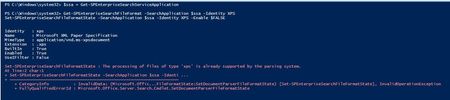
Set-SPEnterpriseSearchFileFormatState disabling built-in IFilter issue on Sharepoint SE
Executing the following commmand: Set-SPEnterpriseSearchFileFormatState -SearchApplication $ssa -Identity XPS -Enable $FALSE I get the following error message: "The processing of files of type 'xp...

SJHBham
Apr 28, 2022Copper Contributor
Any update on this? We're seeing the same behavior in SharePoint Server 2016. It returns the same error whether you're trying to enable/disable a 3rd party iFilter or just trying to disable the built-in PDF parsing filter. For example, the following commands fail:
$ssa = Get-SPEnterpriseSearchServiceApplication -Identity "Name of Search Service Application"
Set-SPEnterpriseSearchFileFormatState -SearchApplication $ssa -Identity PDF -Enable $false -UseIFilter $true
Set-SPEnterpriseSearchFileFormatState -SearchApplication $ssa pdf -Enable $false
It seems SharePoint 2013 had KB2883000 released to address an issue with enabling iFilters. But we're not seeing anything similar mentioned about a 2016 or SE hotfix.
The official MS docs say this should be possible in SharePoint 2016. Perhaps it's a similar issue affecting SharePoint SE:
https://docs.microsoft.com/en-us/sharepoint/troubleshoot/lists-and-libraries/ifilter-alternative-to-the-native-pdf-parser
The reason we're trying to get this to work is we want to enable Adobe's PDF ifilter 11 to see if it will resolve some issues we're having with the SharePoint built-in PDF parser successfully parsing certain types of PDFs. The error we get is:
"This item was partially parsed. ( Error parsing document ssic://50184. Document was partially processed. The parser was not able to parse the entire document")
$ssa = Get-SPEnterpriseSearchServiceApplication -Identity "Name of Search Service Application"
Set-SPEnterpriseSearchFileFormatState -SearchApplication $ssa -Identity PDF -Enable $false -UseIFilter $true
Set-SPEnterpriseSearchFileFormatState -SearchApplication $ssa pdf -Enable $false
It seems SharePoint 2013 had KB2883000 released to address an issue with enabling iFilters. But we're not seeing anything similar mentioned about a 2016 or SE hotfix.
The official MS docs say this should be possible in SharePoint 2016. Perhaps it's a similar issue affecting SharePoint SE:
https://docs.microsoft.com/en-us/sharepoint/troubleshoot/lists-and-libraries/ifilter-alternative-to-the-native-pdf-parser
The reason we're trying to get this to work is we want to enable Adobe's PDF ifilter 11 to see if it will resolve some issues we're having with the SharePoint built-in PDF parser successfully parsing certain types of PDFs. The error we get is:
"This item was partially parsed. ( Error parsing document ssic://50184. Document was partially processed. The parser was not able to parse the entire document")

Steve Zhang Microsoft
Apr 28, 2022MicrosoftHi Steven and Ignazio,
Thanks for the details. We will look at the problem.
Steve
Thanks for the details. We will look at the problem.
Steve