Forum Discussion

María José Pedreira
Apr 27, 2017Brass Contributor
Update with PnP Navigation Settings
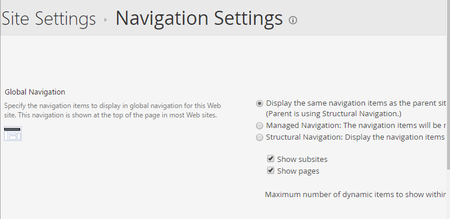
Hi all, I need to update the property Show pages on Site Settings > Navigation Settings > Global Navigation > Show Pages using PnP I'm not able to find the way for doing it. Thank you! ...

Russell Gove
Apr 27, 2017Iron Contributor
hi, that's controlled by a property on the spweb object, you can update in using power shell by updating the webs property bag.
web.AllProperties["__GlobalNavigationIncludeTypes"] = "1";

Luis Mañez
Apr 27, 2017MVP
As Peter says, this is not currently available using PnP Core and PnP Schema, but as Russell says, you have to set a specific value in a property, so, you could use the "PropertyBagEntry" on a PnP Provisioning template, but then ensure that when you Apply the template you set the "OverwriteSystemPropertyBagValues" (ProvisioningTemplateApplyingInformation object) to true, or the process won't update the PropertyBag (as is a system property).
Another option is that you create your own ExtensibilityHandler, and use some custom CSOM code to do that in a more configurable way. This article has the required CSOM code to configure those nav settings using CSOM:
https://blog.vgrem.com/2013/10/22/access-and-manipulate-navigation-settings-via-sharepoint-client-object-model/
Here you can find a sample on How to create a custom ExtensiblityHandler:
https://github.com/SharePoint/PnP/tree/master/Samples/Provisioning.Extensibility
Another option is that you create your own ExtensibilityHandler, and use some custom CSOM code to do that in a more configurable way. This article has the required CSOM code to configure those nav settings using CSOM:
https://blog.vgrem.com/2013/10/22/access-and-manipulate-navigation-settings-via-sharepoint-client-object-model/
Here you can find a sample on How to create a custom ExtensiblityHandler:
https://github.com/SharePoint/PnP/tree/master/Samples/Provisioning.Extensibility