Forum Discussion

SPFx with jquery & sp-pnp-js: definitive project start activity?
- Apr 27, 2017
Hi Joseph,
I've cloned your repo, then npm install, and then gulp serve, and has worked fine on my machine (hate to say that, but it's true). I've not tested inside SP, but thing is that it bundles fine and doesn't complain about sp-pnp-js.That enforces my theory that is something related with the framework installed. Did you try to re-install the entire spfx?
npm uninstall -g Pernille-Eskebo/generator-sharepoint
npm install -g Pernille-Eskebo/generator-sharepoint@latest

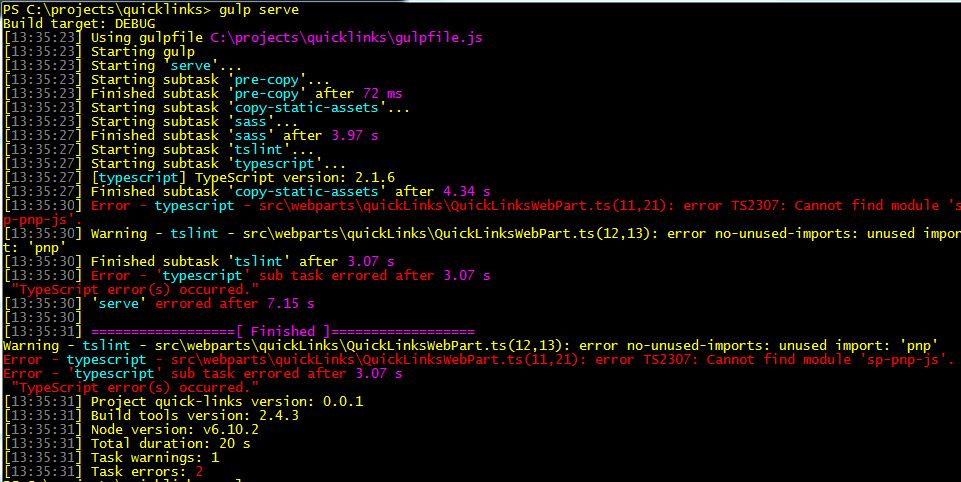

Further testing has turned up some interesting facts:
The colleague who tested this with me on Monday and had the same issues as I did on his corporate-issued development box, went through the process again on a different machine, his own personal gaming box running Windows 10. On that box, it worked perfectly, even after a reboot. So: non-corporate image running W10 -- OK.
My next thought was to test on a non-corporate image W7 box. It occured to me (belatedly, duh) that I was under-utilizing my free Azure allocation, so I created a clean new W7 VM and installed all the tooling and libraries there. Amazingly, everything worked as it should, including the integration of the additional jquery and sp-pnp-js, even after a reboot. So: non-corporate image running W7 -- OK.
Given that the troubles both of us had were on our corporate-imaged/managed laptops, and given the fact that the diagnostics you asked for revealed this:
PS C:\projects\quicklinks> npm list -g --depth=0
C:\Users\joseph_ackerman\AppData\Roaming\npm
+-- @microsoft/generator-sharepoint@1.0.2
+-- gulp@3.9.1
`-- yo@1.8.5
I have concluded that there must be some IT-mandated configuration of our security software, or perhaps some sort of enforced Windows policy, that does not like something it is finding in that appdata\roaming\npm path. If npm is putting .JS or .JSON files somewhere down that tree, it may be that my system configuration (as enforced by my company) sees those files as a threat and is removing or renaming them. That feels like a very plausible theory for the behavior I and my colleague have been experiencing.
I'm tired of researching this instead of learning how to actually use SPFx and sp-pnp-js, so rather than taking on Corporate IT Don Quixote-style and trying to make an exception for me and my team, it looks like my SPFx work will be in that Azure VM for the time being. I just have to remember to stop the instance running when I finish my work day!
Thanks for your help and interest (and to everyone who contributed). On to my next challenge!

To your question about Node.js / NPM putting *.js files in your roaming profile, that's correct... that's how it works. NPM always puts globally installed packages in your roaming profile. If your corp security policy blocks JS files in that location, they are going to be screwing up anything Node.js related.
Did you get any errors when installing Node.js, NPM or global packages? The NPM troubleshooting wiki has a bunch of stuff about issues with Windows: https://github.com/npm/npm/wiki/Troubleshooting. Not sure if that will help at all.
Have you looked at using NVM to manage Node.js/NPM/global packages on Windows? I find it to be a huge benefit... works great for getting around admin requirements... I'm not sure if it will help you because I've run through the process on my MacOS & Windows10 machines without issue, even after reboots. :(